Unknown's avatar

About thinkinetic

Interested in computer graphics and visual FX.

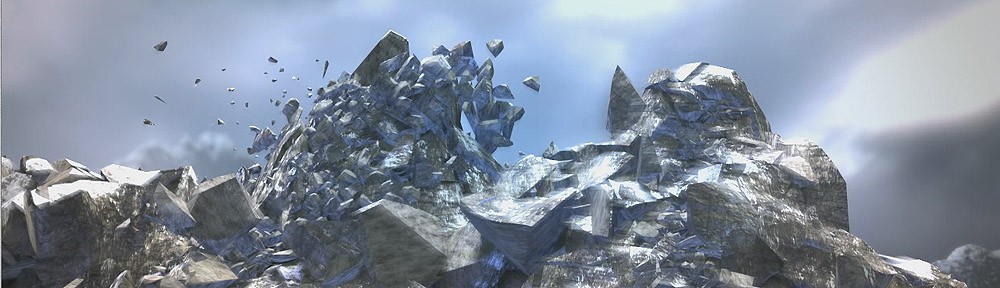
Thinkinetic Logo Mountain destruction

Pedro Ivan de Frias tell us some technical details about this impressive clip using Pulldownit in 3d max


MODELING

The Thinkinetic  Logo was an easy task to do, just using splines to fit the shape; modeling the mountains instead took a lot of work, using  a base 4×4 section and start adding  polygons with soft selection to exhaustion, there are other methods using heightlevels with 2D tools images but I wonted and special shape in the central mountain to keep the Logo inside so no other way,  when the overall shape was done, I refined everything using sculpting tools in MAX.

SHADERS

For environment mountains I applied procedural shaders, specifically an  Arch&Design-Mental Ray material, in this way I got the rock and snow-like  details, for the mapping I used Unwrap for achieving the final look.
The central mountain is mapped equally with an  Arch&Design-Mental Ray material, but adding 4 composite levels to stress the rock and snow-like  details, using Unwrap mapping. For fragments Inner faces I applied first the great  PDI “cut material”, in this way I got all these faces differentiated from others after shattering, then I edit this material to include two different procedural shaders, to get the look of wet rock in the interior of the mountain,  finally mapped using UvwMap Box.

SHATTERING:

I used the amazing Shatter it tool of PDi for this, first of all I checked  “Assign cut material” to get a different  shader on inner faces,  I needed a dense resolution of fragments to generate nice cracks  regarding camera view later, so I started breaking the mountain in just two areas, base and peaks, as I would need much more fragments later in the top area and a few in the base; then I created several splines following the surface of the mountain, and used the incredible PDi path-based shatter to create  little fragments all along the paths, to generate nice  cracks later in dynamics, finally I got near  5000 fragments on scene.

DYNAMICS:

I set substep 10, it is slower computing but you get more accurate dynamics, using  PDI I created a fracture body for the whole mountain, and let parameters by default,  I used the crackers objects created by PDI path-based shatter to generate the dynamics cracks on the suface of the mountain, It was not difficult to control the strength of crackers effect  using path constraint parameters in MAX panel.
The Thinkinetic logo was too complicated to include it in dynamics, with the different letters and such, so I did a rude dummy with the same overall shape but rounded, and animate it to hit the fragments in the same way the real logo would do, I replaced the dummy for the real model when rendering .

RENDER:

Using Mentalray and LPM render manager,  I splitted the scene in four passes,  sky, environment  mountains, central mountain and logo, each group keeping the lights information of the scene, and composing everything later in postpro.In postpro I added the lightning animating the gamma using different masks for Gamma  to isolate some areas and affecting the main models.

Ivan  has been involved  in the Spanish animated film “Tadeo Jones” recently as Ligthning TD.

http://www.pytonproducciones.com/

Office Towers Collapsing by Boris Bruchhaus

Boris Bruchhaus did this impressive clip with Pulldownit in Maya, he kindly shares some details with us.

I did this as a personal project to test out Pulldownit for future work. Firstly, I modeled the tower based on and matching the plate I shot myself a while ago (I used to work in that building). I then fractured the model into about 4000 pieces, grouped together in sections.

The rbd-simulation itself was split up into layers (top windows/first explosion, main building etc.).After several versions the sim was finally cached.

I combined all the animated pieces together with history on (keeps the animation curves), so that I just had one big poly shape to use as an emitter for particles. Based on their velocities the particles are emitting into a fluid-container (resolution 400x100x100) to create the main dust/smoke. Additionally I also emitted particles from the debris to use as instanced small-debris (about 45.000 pieces).

After a while the scene, looked through the shotcam, got a
bit messy, so I just added another cam to capture the simulation from a more total-perspective.

I rendered the smoke (with holdout from the debris), the debris and the instanced particles independently and comped everything back together in Nuke (very rough)

Pulldownit is already a great destruction tool. I miss the ability to add more complex edges, believe me Pdi is “solid rock” stable computing, I think  adding some more scripting/event-based possibilities would be very useful in production.

Boris  currently works at MPC in London as a FX Lead TD

http://www.imdb.com/name/nm3990680/

Meteor strikes at St. Pancras station

Hey, no worries,  it isnt real at all, actually Luis Tejeda did this impressive scene with Pulldownit in 3D Max, in this article, he kindly share some details with us.

After the success with the winegalss breaking test, I decided to try something bigger with Pulldownit to test the real power of this amazing plugin.

I wanted to portray a scene of destruction as credible as possible by using a real world model. I decided to recreate Saint Pancras Station in London. It is an emblematic train station, which connects the European continent with the British Islands through a huge tunnel. I liked it and I thought it was a great candidate for my clip. Sadly I relied on just one machine to do this work, so I tried to keep the project as simple as possible by removing local lighting and some geometric details. Nonetheless, the model of the station isn’t low-poly at all, hopefully resembling the intricate look of the real station.

I used an Intel i7 quad, 8 Gb ram machine, with an Nvidia Quadro FX3800 card. I must say with Pulldownit I did all the destruction work in less than 10 minutes. It was very easy to use. I’m practically a beginner with Pdi but everything went very smoothly.

You can see several metal beams in the ceiling being destroyed, also some glass panels explode and finally a long crack is created all along the platform. I used Shatter it tool to pre-fracture all these, except the beams. This is because I wanted them to break as single crossbars rather than in clusters, so I simply created fracture models for the beams’ geometry. I think the end result looks more real by breaking them this way.

The ceiling of Saint Pancras is a kind of industrial glass so I used a radial shatter style to get the best glass breaking effect when the meteor hits. In reality, the meteor I used for this shot was much bigger than the one shown. This way I was able to get bigger potency thus making the effect much more impressive. I simply hid it from the screen and displayed the smaller one instead. In the end it looks like the small meteor generates the shock waves, which give way to the rest of the wreckage. In addition, the ceiling is resting on hidden walls to keep it steady until first impact.

For the three exploding glass panels I used uniform shattering. They break upon impact with the meteor; it was a straightforward task in dynamics. The platform floor next to the panels also has uniform shatter, but since I wanted some fragments to remain intact, I used Pdi advanced fractures to set which fragments should break and which not.

To create the dynamic crack on the floor I used path-based shatter. This is a great feature of Pdi. It consists of a small sphere that moves along the fragments, cracking them like a little earthquake, very impressive. As a final touch I added a forgotten suitcase that interacts with the cracks and then falls into the gap when it topples over. I think it gives the scene a bit more drama and it was very easy to do.

Dust was added in postpro using a plugin for After Effects called “Trapcode Particular”. I wanted all the destruction effects to be clearly visible so I added only a soft dust layer. Trapcode worked great for this, it allowed me to make the dust follow the meteor’s trajectory and also tweak the transparency, luminosity and the intensity of the dust layer. There is a videotutorial about this effect on my own channel: www.youtube.com/3dluistutorials . I also speak more extensively about modeling, shaders, lights and postpro for this clip.

Luis Tejeda is a freelance 3D artist. He is located in Chicago, IL, USA.
If you are interested in his work, you can contact him at:

3dluis@gmail.com
http://www.3dluistutorials.com/portfolio

Thinkinetic at MetroGamers

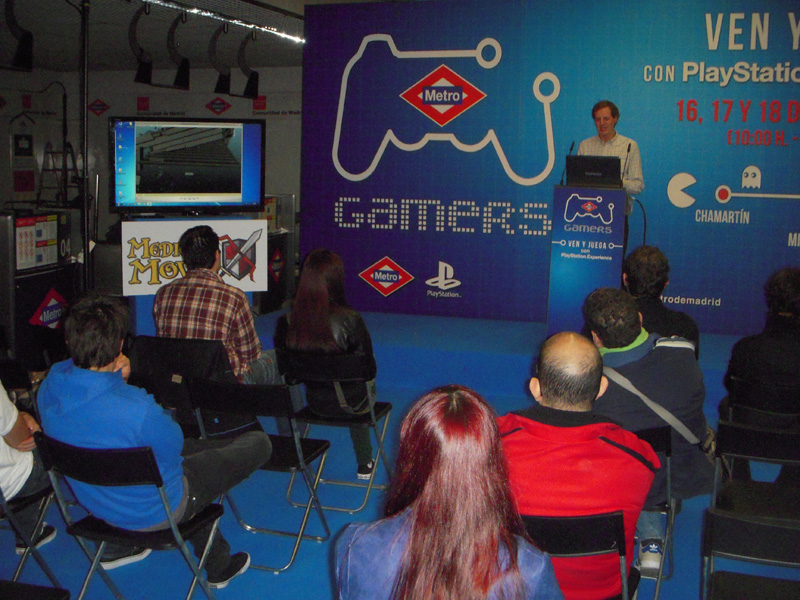
Carlos Pegar, product manager of Pulldownit plugin was this weekend at MetroGamers Madrid, a videogames event promoted by Sony Play Station, Carlos was introducing Pulldownit to the audience and the use of the plugin in several recent Play Station games.

From Thinkinetic we want to thanks to organizers of the event , specially Joaquin Perez from the European University of Madrid for the care it took to everything going fine for the presentation.

select03

Battle: London Winner Shot by Igor Gonzalez

Igor Gonzalez is the brilliant winner of Battle:London, an internet contest announced by VFXlearning,  http://www.vfxlearning.com/,  the goal of the contest was setting up London city center being attacked by Aliens in the style of recent film Battle:LA, mixing real footage with 3D models and effects. In this article Igor tell us how he managed to got his great clip,

My initial idea for the clip part of getting a frantic pace in the video because the movie Battle: LA, the source of the challenge, is featured by close-ups and fast action. That’s why I decided to overlap the movement of combat ships in a few frames, just enough to be intelligible, also to show as many of them as possible on screen, that’s the way I made my first animation.
The first thing I had to do was match-moving of real camera, and it was not easy, since due to the shutter speed that was recorded was a lot of  blur and I had to do a manual tracking almost frame by frame. Due to the lack of parallax in the footage I had to choose a camera tripod type and the integration of 3D elements was more complicated, I had to use Google Earth satellite maps for the location of the elements in the match-moving.

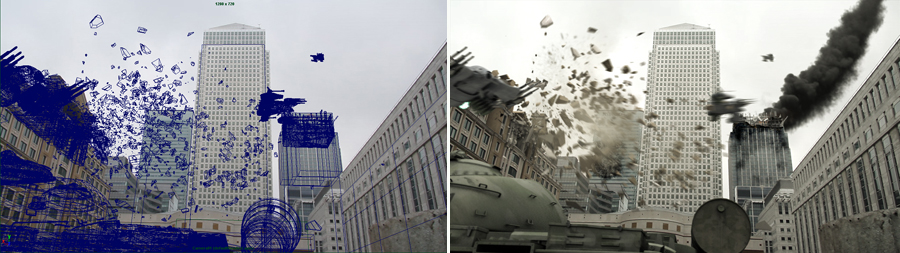
breakdownCollisionWhite

MODELING

For the clip I made a few buildings, or pieces of them, and some detail of the ships and tank, battle ships are from my colleague Jorge Sanchez. The shading of all elements is mine. It would have been great to have more time to work on it because I think texture is most noticeable in the integration.

ANIMATION & RIGGING

All the rigging of the scene are mine, the ships have a basic rig just to control the turbines and parts of the wings, and some MEL scripting to automate the animation of the guns recoil when shooting and control its speed. The tank has a simple rig will implement a system that allows the wheels to rotate with the chains if the tank progresses. The animation of the fall of the ship is made with Maya rigid bodies, along with animation keyframing. To achieve the best possible physical realism, the pieces were generated with Pulldownit.

breakdownSmokeWhite

FX DESTRUCTION

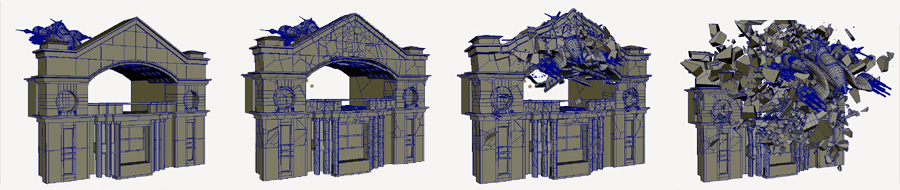
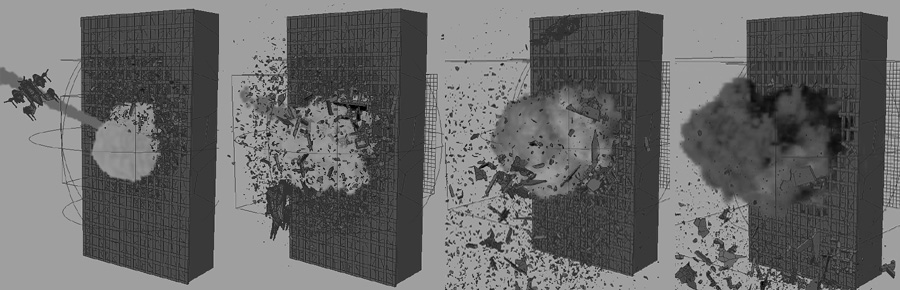
The destruction of the arc of the terrace and the rear building are done with Pulldownit free plugin, this was my first attempt with this tool and honestly I was pleasantly surprised, both were modeled so that they are thoroughly realistic break (the fragments were generated with Voronoi-based free script though), there is an explosion in the rear term above that generates thousands and thousands of glass fragments (sadly hard to be appreciated). However, I didnt like the final timing of the simulation so I modified it after baking keys.

DUST & SMOKE

Maya classic particles were used for generating the secondary debris as instances of other fragments and some basic MEL for turns, variation of mass, size, etc.. they were also used for smoke of missiles, especially PP-ramps,  and finally added collision events to generate sparks in the tank due to impacts. For the caps of the ships I used nParticles instead, because its dynamic behavior allows them to bounce on impact with the ground. Finally I used Maya fluids in the smoke and fire from the building on the right, the dust generated by the ship in contact with the ground (particle emitting fluids) and the meteorite falling from the sky. I used near 6 GB of memory for all of this.

breakdownCompo

LIGHTS & RENDER

The lighting was done with the IBL technique, using an HDRI image downloaded from a free site and retouched in Photoshop, to better simulate the floor of the scene and to darken the bottom of the ships and adapt it to the tones of the real camera footage. All shaders count with tone-mapping with a gamma correction as the camera has and exposure control and lighting gradients are more realistic. Thanks to the render layers manager of Maya I could do the render in the time required, as are a lot of layers and it allows to launch render queues with various configurations (software renderer or mental ray) at a time.

POST PRODUCTION

I used After Effects, because although such a project would have NUKE best result, in the end I have more experience with After Effects and given the short time that I had not wanted to risk. I must say AE behaved very well, was stable with near 200 layers, great!!
I had to fix the automatic change of exposure of the real camera also added some Action Essentials to give more prominence to the computer generated effects, because eventually I had no time to generate all of them.

Finally, look closer to Terminator Salvation than Battle LA, but I wanted to risk a little and give a more aggressive look. And I couldn’t resist the temptation to make a nod to Michael Bay, I put a lens flare in the purest style Transformers.

ultima

Shot Breakdown:

Igor Blog,
http://www.igorgonvfx.com/Home/Index.html


Pixel by Patrick Jean uses Pulldownit

We have recently got confirmation Pulldownit Pro was used in the brilliant clip “Pixel” by Patrick Jean,

http://www.youtube.com/watch?v=sNzisBCp4Ho

http://www.onemoreproduction.com/video/209.html

Pulldownit was used for the destruction of the bridge column, Pixel was one of the big hits of 2010 short clips, our congratulations to OneMoreProduction artists  for its great work,  they also used Pulldownit in the impressive music-clip, “La fin de la fin du monde”.

Akropolis by Christoph Saalfeld

Christoph Saalfeld have achieved a very polished clip of an ancient akropolis destruction using Pulldownit plugin in 3DMax among other tools, here an extensive interview in which the author explains technical details about how the clip was done, thanks for sharing Christoph.

http://vimeo.com/29032719

How did you arrive to the idea of this scene?

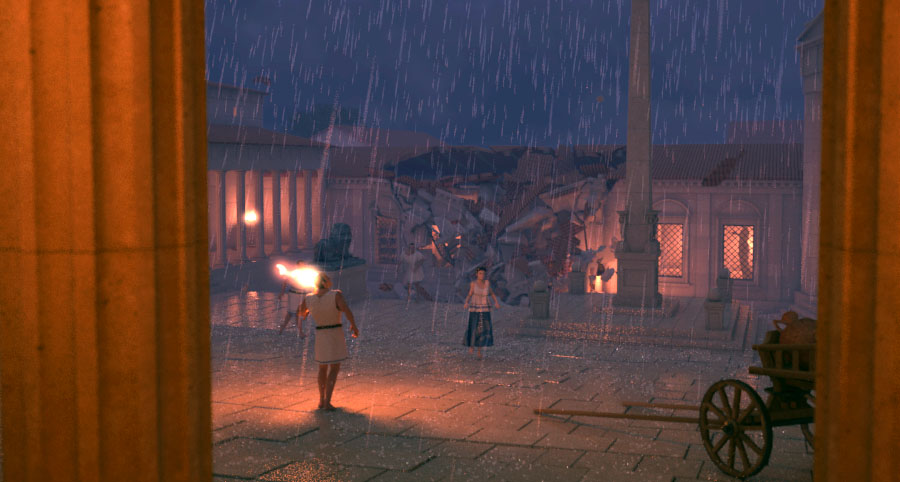
The idea of Acropolis was originally developed out of my initial tests with PullDownIt. I had just heard of it and found out that a demo version was available. So I installed Pdi on my system and of course wanted to blast something right away. Somehow, I had the idea to use a stone pillar as a test object – even a lot of physics tests were made with columns. After I had blown away my column with a ball a couple of times, I placed a second and third pillar in the scene and a few simulations later I had very good results with hundreds of fragments. Somehow I was that much impressed by this test that I have constructed a situation around it. Columns can be found in temples, and as trigger for the destruction I liked the idea of a lightning strike. Furthermore, I always wanted to try to a night situation with rain. In order to be close to the action, I chose the perspective of a handheld camera.

Akropolis_F122_filter

Which tools have you used for making the clip?

Acropolis is one of my spare time projects in which I try to optimize my workflow and expand my knowledge. The whole scene was created in 3ds Max (2010) which is the main tool for me and with which I am most familiar. The scene includes a lot of problems and therefore I also used various tools and plugins to solve these. For example, the character animations were made with Biped that is either driven by hand animations or motion capturing. For the clothing simulations, the Max internal Cloth modifier is used and effects like the rain and the lightning were made in ParticleFlow. For rendering I use V-Ray – it’s a great renderer for global illumination and 3D motion blur, furthermore I can work continuously in a linear workflow and decompose the scene in different render passes due to the V-Ray matte features. With FumeFX I created effects like fire and dust which were calculated with V-Ray in a separate render pass. I also took advantage of PullDownIt for the rigid body dynamics. Especially thanks to FBodys, where objects remain still until an impact occurs, it was easy to create the destructions. At the same time, the possibility to group objects and break them when a certain force exceeds is almost essential for a realistic-looking rigid body simulation.
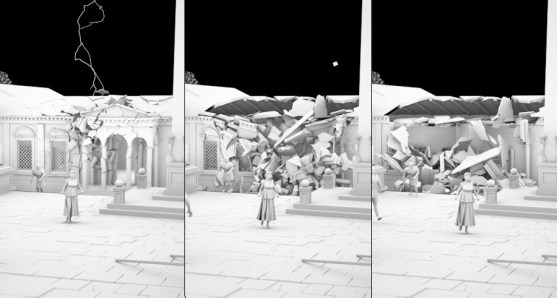
Akropolis_PDI-01_Clay

Which effects was Pulldownit used for?

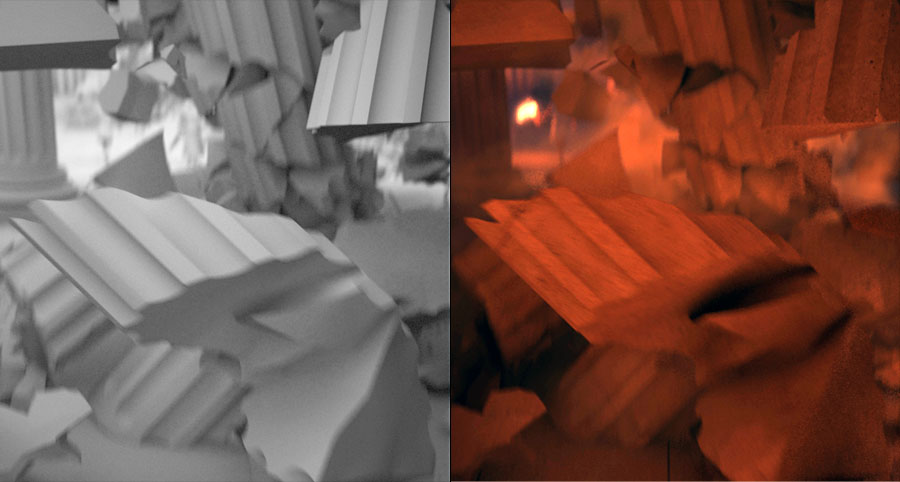
The clip includes two major Pdi simulations. After the first flash, the camera turns and we see how the building in the background partly collapses. The second lightning hits one of the pillars at the entrance to the Acropolis and throws large pieces against the pillar behind it so that this one is breaking also. After missing the support of the columns, quite a bit of the roof structure drops down and breaks the pillars into even smaller pieces.

After the modelling and texturing of the set is completed, I copy the objects needed for the simulation into a new file and then work there on the facturing and physics simulation. I find this very convenient since the Max scene is getting smaller again. Here I created the necessary low-poly collision objects and the fracture parts. Then I optimize the settings of PullDownIt specific to this situation and the selected camera angle. After all the basic properties like the “bounding volume”, “Passive or Cached” and the fracture bodys are declared, Pdi already created a good animation with the default values. But this can still be improved with further fine tuning. So I put a bigger mass value on very large fragments and increased the friction of the collision objects to suppress the slipping of the stones. However, the most important values are Hardness and Clusterize for the individual FBodys. In order to achieve a nice fragmented blast, I took advantage of Hardness 40 and Clusterize 70 %. One of the most recent changes was to increase the gravity to match the speed of the falling objects with the dynamic of the shot. For the final simulation, I used 25 sub-samples which was still simulating quickly with more than a thousand objects. After I was satisfied with the results, I was able to merge all the pieces including the baked animations back into my main scene. There I moved the whole thing on the timeline so that it starts at the right moment.

Akropolis_PDI-02_Clay_01

How did you combine dust & debris?

It’s actually relatively easy to produce a matching dust to a finished simulation. I have divided the dust into two fluid simulations which are rendered in one pass. The first FumeFX container creates some thin dust while the debris is falling down. To do this, the fragments are used as emitter in a position object operator in ParticleFlow. The lock on emitter function makes sure that these particles move with the objects. With a spawn by travel distance test, new particles are produced when the pieces are moving. This event can be used in FumeFX with a particle emitter as a starting point for a smoke simulation. The dust cloud that is produced when the debris hit the ground is working quite similar, expect that a collision test was used instead of a Spawn by travel. The invisible collision plane should be located slightly above the actual floor, so that the particles locked on the fragments can penetrate it. I have used a second container for this ground dust, so I can change the properties of the dust and make it much thicker and slower. When I make a render pass for these dust effects I leave all objects as matte objects in the scene. With a separated pass the dust can then be edited very well in the compositing.
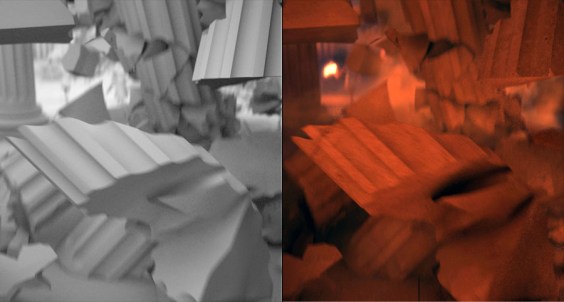
Akropolis_PDI-02_Breakdown

The shot looks like camera on hand, how did you animate the camera?

The camera work is – as I call it – a character-driven camera. For this, a simple CAT rig (the base human) is running through my set. I don’t put much effort in the character animation, I only use two of the Motion presets delivered with CAT (GameCharRun and GameCharWalk). I am switching between these presets according to the speed I need. In the CATMotion layer a path constraint helper is picked that gives the Char a spot to follow and with the ground object picked, CAT is generating the footprints automatically. Even if I had to rebuild my ground as one object again, the rest of the character animation is working almost automatically or by simple animation of the path node. The camera is linked to the head of this rig so you got that swing that occurs when running. The camera target is a little more difficult to control. I’m using three point helpers for various effects, another point helper is position constraint between these three and transmits its position to the target camera. The first point helper, located at some distance (directly in the viewing direction of the character), is linked to the head of the Char. The second point is in a free standing position and can be animated by hand in order to manually control the view. The last point is linked to the second one and includes a noise controller which produces camera shakes. In the Position Constraint of the last helper all the weightings can be animated, so you can choose which point affects the target and to what extent.

Akropolis_PDI-01_Breakdown

Tell us your feelings about Pulldownit at this moment, even wishes about  future development.

PullDownIt is a great plugin that can create good rigid body simulations, especially in a very short time. I am fascinated by the accuracy of the collisions and the stability with a lot of objects. The progress to set up a simulation is simple and clear, the values are almost explained by itself. For me, the best features are the possibilities of FracturBodys and StressMaps, but also the built-in shatter system is pretty good. PullDownIt is definitely an alternative to Reactor and PhysX. For further developments, I can imagine another shatter style that creates very irregular shapes, for example.

Tell us a little about yourself, your background, future projects.

Hi, I’m Christoph Saalfeld, but actually everybody calls me “Sali”. I’m 27 years old and I have been working with 3ds Max for over 7 years now. I’ve studied Multimedia | Virtual Reality-Design at the University of Art and Design in Halle (Germany). For the last 3 years I have been working as 3D-Artist in the media department of a large construction company. Here I am mainly working on 3D animations for museums and architectural visualizations. But my personal passion belongs to visual effects and character animation, and therefore I work in my spare time on small video clips with a little more action. At the moment I am building a shot called “Randy’s”, where some super heroes will create some chaos. Two larger PullDownIt simulations will also be included here. In the longer term, I am planning an animated short film about one of my favourite fights from Dragon Ball Z. Of course, I have a small blog (www.intervirtual.de), where I’m documenting my work. I would be pleased if you find the time to stop by.


Pulldownit used on Harry Potter and the Deathly Hallows Part 2

We are proud Pulldownit plugin have been used by Cinesite to create some of the stunning VFX in latest Harry Potter film, specially the destrution of Gryffindor tower marble staircase, learn some details about production in this extensive article by Debra Kaugman where Pulldownit use in mentioned:

http://magazine.creativecow.net/article/cinesites-magic-touch-with-harry-potter-and-the-deathly-hallows-part-2

Congratulations to Cinesite artist for his great work, Pulldownit use is featured in Cinefex issue #127 october.

Wineglass breaking by Luis Tejeda

This was just a fast test of a wine glass breaking shot, after traying PDI plugin with some basic scenes sucessfully I wanted to test it in a more dificult  one that other tools have failed to achieve with good results.
The shot is done in 3d MAX 2012,  I created the wine glass lathing 360 degrees a spline line, after converting it to poly I added the glass shader.
Then I shattered  the wine glass in 128 fragments using “radial style”,  which gets a very convicing cracking pattern for a bullet impact. I selected  the option “Hide original object ” to use the original solid model later in render.
Setting dynamics properties for the ground and the ball was very easy, I set both of them to “auto”, pdi auto detect the bullet is animated and “passive” was autocheck, I set also the ground as a passive object.

sequence

Then I created a fracture body with all fragments, setting hardness 40 and clusterize 20%, I made several tests until getting the more convicing result, this wasnt difficult as PDi computes very fast.  I used “substep” 25 to compute dynamics , in this way I got better quality specially becouse the bullet was in very fast motion and needed more substeps.
Finally I made the render with V-ray, I have to render also the original wine glass before bullet impact and compose both shots later in postproduction,  this is becouse otherwise the fragments are visible from the beginning.