
Pulldownit plug-in for 3ds Max updates to version 6.5, adding useful features to the non-destructive workflow introduced in previous version and fixing some usability issues.
New ability to increase or reduce fracture clusters size, alongside the Edge Fracture tool you can easilly add debris on detaching clusters or re-size exploding areas at ease.
New “Eraser” tool to reduce fragmentation, allowing artists to get quality fracture results while maintaining control over the number of fragments generated, you can visually erase shattering areas and play the simulation immediately, undo last operation or recover the original shattering at any moment.
New ability to change source node of a breakage, allowing artists to apply an existing breakage to a different model, or re-use it as starting point for a new destruction effect.
There are also several bugs fixed, you can check the whole list of fixes in the Pulldownit version logs page:
Read the full list of fixes in the Pulldownit web site version logs
Licensed users can already access Pulldownit 6.5 from his account and there is a demo version for 3ds Max 2027 in the Thinkinetic web site.
Shatter New Features
New Erase Fracture Tool, this new tool allows to reduce fragmentation on the model interactively, you can undo your changes at any moment.
New Re-shatter option “Set Current as Base Breakage”, this new option allows to set current shattering as base breakage, you can revert to base breakage at any moment.
Dynamics New Features
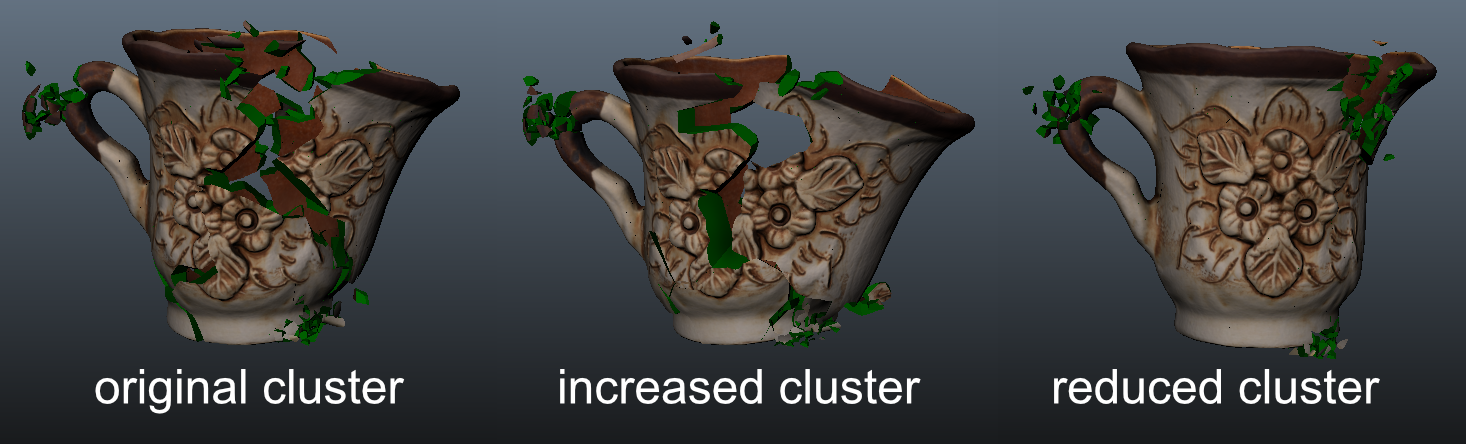
New ability to resize fracture clusters, now you can reduce or increase fracture cluster size at ease just by clicking in the intended buttons and compute simulation immediately.
UI Enhancements
New Shatter it “Select Source Node” button, by clicking on it you can ser a new geometric node as source for the current breakage.

