Ruben Morales, Lead FX Artist at Sony Santa Monica, has posted an awesome reel showing his work at God Of War game using extensively Pulldownit plugin for destruction effects in Autodesk Maya.
Ruben kindly explain his experience with Pulldownit plugin during the production:
“When looking for good plugins to use for God of War in 2013 I had heard of pulldownit as a tool some places were using for destruction. And from the start it felt so user friendly with its options. And instantly chose this as the tool to add for the destruction pipeline. On the latest God of War (2018) we used it heavily for simulations and shattering of some objects. With larger scale breaks we still hand cut the geo but would take that new mesh that needs to go away and shatter it. then run any number of simulations needed with Pulldownit.
I even tell my students to look up pulldownit, if they want to try destruction work. it’s very easy to learn and allows me the control I need. Highly recommend it for anyone wanting to dabble with destruction.”
Ruben morales
Lead destruction artist
Sony Santa Monica
website: Morales3d.com
thank you very much for your testimonial and showing those amazing videos Ruben.
Thinkinetic is offering Pulldownit 4, the latest version of its destruction plugin with a 20% discount during this summer.
discount code : summer18
just input the code before selecting your product in the Thinkinetic online shop to get your discount applied, by licensing the plugin you will get fixes and updates during one year.
This code is valid until 31st August for either 3ds Max or Maya plugins, single or floating licenses.
Pulldownit 4 was released recently with several new features you can review here,
3d Artist Issue 120 includes a 2 pages review of Pulldownit 4 for Maya by Paul Champion, For testing the plugin Paul has done diferent fracture tests with a final verdict of 4/5 stars, that means “Essential” tool for 3dArtist magazine.
“A stride forwards in creating more realistic simulations in less time”
Hum3D survival car challenge 2018 has ends, as sponsor of the competition Thinkinetic is proud to gift a Pulldownit Pro license to the winners, congratulations to all of them.
Take a look to the winners works and best finalists in the official announcement:
Pulldownit 4 for 3ds max has been released and comes with several new powerful features you can see in action in the technical reel below.
The whole plugin has been updated and tuned for better performance and usability, fracture solver is around 30% faster and we have took our time to fix a few stability issues of previous verison, all of this makes this new release more responsive and with faster iterations.
Pulldownit plugin is fully integrated in 3ds Max and destruction scenes can be exported to other platforms using Fbx or Alembic formats, adding its range of features makes PDI a valuable resource when working in either VFX or Motion Graphics projects.
Below listed the most relevant highlights in Pulldownit 4 for 3ds Max.
Shatter New Features
New Adquire Shatter style, new style to transfer a current shatter pattern and animation to another object, by using it you can apply the same destruction effect to a version of the model with different shaders applied or to a hi-poly version of the same model.
Shatter based in volume shape, now you can use any polygonal shape to constraint the shatter effect to its contour, this is especially useful when shattering based on an impact object.
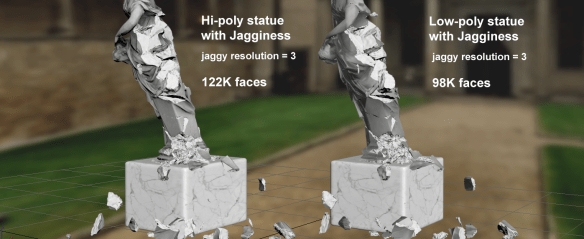
Jagginess( v2.0) independent of tessellation, new Jaggy method is independent of the original mesh tessellation, getting much lighter jaggy fragments when the object is hi-poly, and removing the artifacts caused in borders of high tessellated models.
New soften edges UI parameter for Jagginess. New parameter to adjust soften of jaggy edges to get the amount of roughness desired in inner faces. In addition new soften method removes visible seems on inner borders from previous method.
New option to apply jaggines to broken fragments only, using this option for non-moving fragments you can apply jagginess only to the areas which has been broken in simulation, getting much lighter meshes for rendering or real time games.
Dynamics New Features
Speed up Fractures solver 30%, PDI dynamic solver has been very fast since its first version, in this latest release you will experiment faster iterations when working in dynamics.
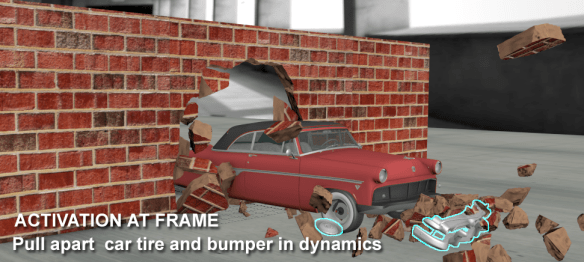
New ability to pull apart pieces of an animated object at desired frame, besides activating rigid bodies at first hit you can now set the frame when they become active and if the bodies are linked to an animated object they adquire the velocity of its parent.
Reset keeps selected, you can now bake keys only for selected fractures and rigid bodies, letting the rest to continue being driven by simulation, baked fractures can still interact with other objects by setting the animated fragments as kinematic bodies.
Animatable Fracture Parameters, new fBodyAnim modifier allows to animate fracture hardness, friction and bounciness values during simulation.
Cluster break energy is now independent of body mass/scale, we have removed break energy dependency on mass and scale making more intuitive exploding fragments at desired frame.
Alembic caching is a popular format to exchange animated assets between applications, indeed Alembic is supported by most 3D platforms today.
Besides Alembic is an efficient method to extract raw animation data from meshes so by caching the object you get rid of any computation applied to the mesh in this way complex scenes and animations can be exported as an Alembic file, and then re-imported into Maya to improve playback performance.
Pulldownit supports Alembic caching in Maya and 3ds Max, in the tutorial below Esteban Cuesta shows us how to cache a PDI simulation with Alembic in the way we store one single mesh per fracture object.
Important to mention Alembic doesn’t save shaders applied to the mesh, but only a reference to them so to can see the materials applied to the mesh they must be present in the scene before loading the alembic file.
The Virtual Assist has published an extensive interview with Carlos Pegar,
Product Manager of Pulldownit plugin, in the interview Carlos gives more insights into new features of Pulldownit 4 and best worflows using it:
“We have learned users likes fast iterations and responsiveness when working in dynamics, so we will continue improving the tool in this sense, and of course adding more cool features to make 3D models crack, crumble and break apart, More the destruction, more the fun!”
Pulldownit , the destruction plugin, is already available for 3d Max 2019, this update includes also a number of bug fixes you can read in the Pulldownit version logs pages,
The major additions to 3d Max 2019 are support and editing tools for OSL shaders, a new procedural wood material and booleans operation fro splines similar to those for 3D shapes, this may look like not enough to justify a major version but the new policy of Autodesk is to include new features regularly in software updates, they dit it in Max 2018 with paramount additions like Max fluids , VR support, new spline tools and important Arnold render updates, so there will be probably interesting features to come in futher updates of Max 2019.
Booleans operation for splines is an useful addition as it is faster and safer to modify a spline with booleans and then extrude it than applying booleans directly to 3d shapes which many times fails to do it correctly.
The new procedural wood material is nice, has quite a lot of controls to adjust the wooden look, like colour, roughness, number of wood rings and shape of the ribbon stripes, but I miss controls to add grime and scratches, just my suggestion for future updates, currently you can get a nice polished wooden look but not an old spoil wood material.
OSL shaders are also worth to check, they are well integrated in the Slate materials editor and the possibilities to create procedural shaders are endless.
Important to mention OSL shaders and procedural wood material are supported by Arnold render and also by Pulldownit plugin so you can shatter objects with these procedural shaders applied perfectly.
Changsoo Eun, 3d artist, has written an interesting overview of OSL shaders in 3d Max 2019 you can read here,
Thinkinetic is proud sponsor of this new “Car Render” challenge by Hum3D.
3D art challenge for the best car in Post-Apocalyptic style. You can choose any related topic from zombie survival vehicles to the Mad Max universe – we don’t limit your creative ideas.
You can summit your work until May 29, 2018.
Pulldownit Pro license is one of the valuable prizes and there are plenty of them, those interested can check rules and prizes here:





 The Virtual Assist has published an extensive interview with Carlos Pegar,
 KineticThoughts