Unknown's avatar

About thinkinetic

Interested in computer graphics and visual FX.

Building Collapse by Ivan Khmel

Ivan Khmel has done this appealing shot of building destruction using Pulldownit plugin in Maya, he kindly explains details about production in this article

In creating this effect I wanted to make it as Hyper-real as possible. Looking for a high resolution photo online of a abandoned brick building. The reason I picked a abandoned building over a street image building image is because a street image has cars and people that would have to be taken out or replaced.

Camera Matching

After finding the photos that I wanted to use. There was a need to establish a Field Of View and camera angle. None of this information was available with the photo, so I used an Image Modeller Software to match and establish the camera in the scene and place locators to model around when imported into Maya.

modelling

Modelling

Importing the scene from the Image modelling software, the first things I did was to lock the camera in position, so you could not rotate or change its FOV. This was to be my render camera. After locking the camera in position I imported the original image as the Camera Image Plane. Using the position of the locators I quickly blocked out the shape of the building using Boxes and Primitives.

The after deciding which part of the building I wanted to destroy which was to be the Main Wall, I set out to model the to be destroyed Main Wall with great detail and in a manner that would lend it to shattering using the PDI  latter on. This meant the wall had to have very clean geo. This also included modelling the inside wall and floors of the building.

To finishing the modelling part of the project I modelled in mid level detail, the position and location of the other parts of the building to be used as collision, for the PDI simulation and later the fluids simulation.

Texturing

Texturing this building needed to be done in a way that would match the style of the original photo.  So after laying out the UVs for the Main Wall I created a shader and imported a textures as a projection, using the original camera as the camera to project the image  from.  After the textures is projected on its baked out using Convert to File Texture setting in Maya hypershade.

In Photoshop the baked out texture is painted on top of, only really used to get the correct colour pallet and some detail locations. Overall the baked out textures rapidly looses resolution on the furthest part of the wall, and that needs to be fixed.

Also the back facing side of the wall will not line up to the photo that was projected so the textures needs to be corrected in that respect.

UVing and texturing the inside walls and the floors using standard methods.
PDI Shattering

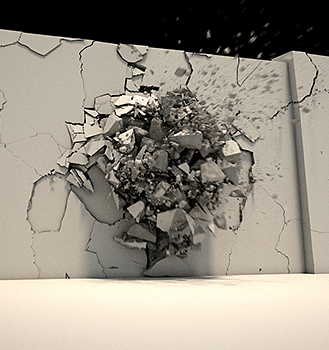
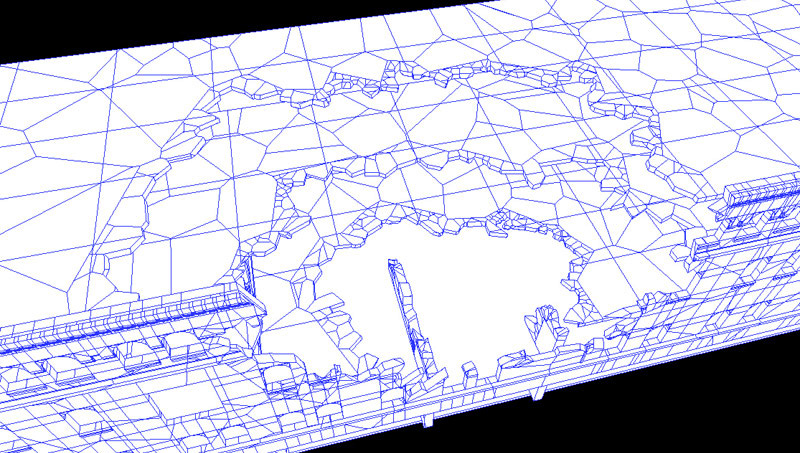
Having the Main Wall the Inside Walls and Floors modelled and textured, the wall is ready for shattering. Using the PDI Shatter It Button I broke up the Main Wall the Inside Walls and Floors into 64 pieces each. After which I select out and separated the parts of the Main Wall, Inner Walls and Floors that I wish to be static. Combining all the static geo into one object. Now we are left with a very low poly shattered wall to add variation to broken edge I went through and re-shattered each shattered bit on the edge by 10 or sometimes 20 if it was a rather large chunk. After which I would select the shattered chunk that would be touching the Static geo and Merged them with the static geo. This gives the edge more of a interesting detail.

I set the Static Geo, Ground Plane and other building parts as collision Bounding Body/Mesh/ Passive objects in Create PDI Body.
Then set the shattered parts as Body/Mesh. Separating some parts into a different groups to be easily selectable. The objects in this separate group was given a small velocity away from the walls normal direction, to create a weakness which would come out first.
PDI Baking

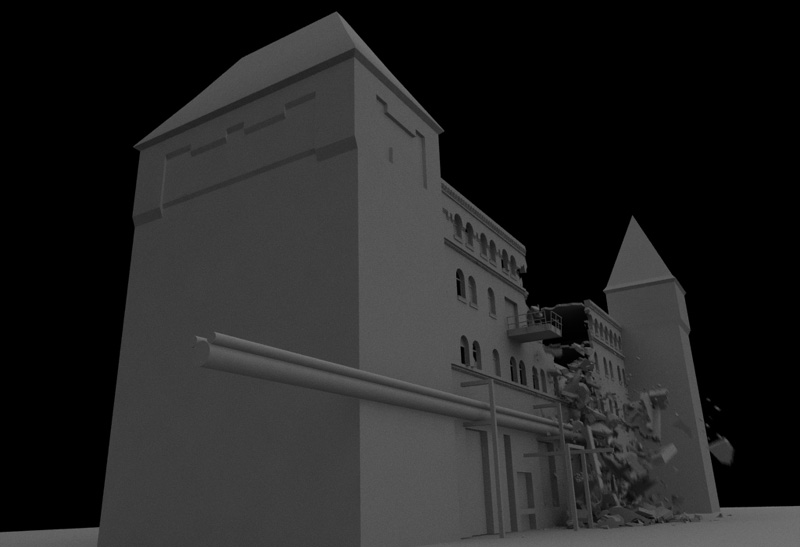
Now baking the simulation . This stage for me was a stage of trial and error. Looking in what way the shattered geo falls, making sure the speed and self collision between parts is working in a certain way. Also looking at a large amount of reference footage of bulldozers ripping down buildings. PDI allows to bake to keys in a very straight forward fashion. After the PDI parts are baked into keys
its ready for cleaning up the scene by removing PDI nodes leaving you with geo parts with baked in keyframes.
Adding Instance Particles

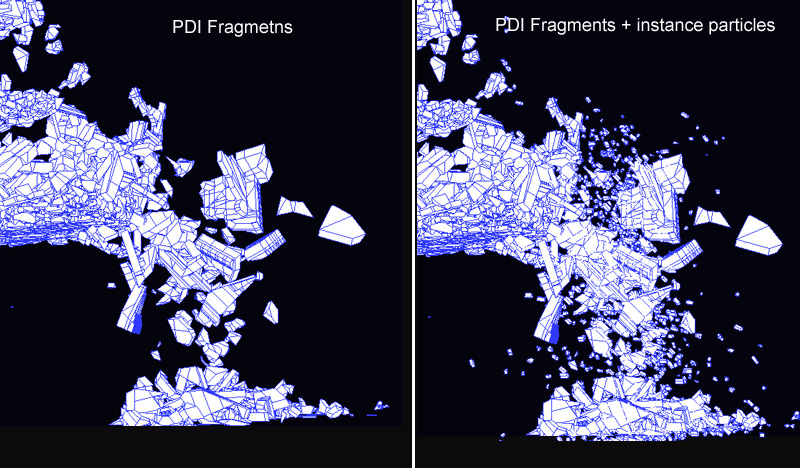
After the shattered geo was baked into keys it was time to added more debris flying down with the shattered chunks. Giving the illusion of more detail and a more realistic collapse. Considering that all the Main Wall parts, Inner Wall parts, Floor parts where separately grouped during the modelling and shattering process, that made it easier to select a number of parts and attach emitters to them. I had hundreds of emitters but only two particles systems. One particle system for instanced bricks and one for instanced concrete. To make the selection of emitters easier I used Mayas Quick Selection Set Shelf Button, so if say I wanted the Main Wall emitting parts to start emitting all at the same time I used the Quick Select Shelf Button which I set and change the values for all the selected emitters in the Channel Box. I set the particles to collide with all the static geo as was done with PDI simulation. Instead of baking the instanced particles into key frames with would blow the scene out in memory I used a simple “seed(id);” expression which is meant to play the instanced particle simulation the same way each time. I added custom expression for scale and rotation and random selection of particle ID with the brick and concrete objects instanced.
Adding Fluids

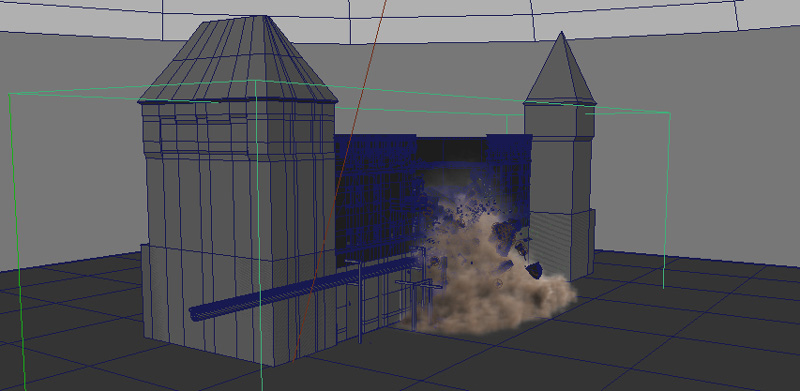
At this point what needed to be added was the dust. I want to have full control over how much dust comes out when falling and how much dust comes out on impact with the ground. After a few rounds of experimentation, I decided to go with having a new one particle system emitted from the emitters already created attached to the PDI baked parts. This new particle system will die and create a new second particle system on collision and that new particle will emit its own third particle system. This final third particle system would emit the fluids when the parts start to hit the ground. And the first particle system falling through mid air before the collision will emit dust fluids, simulating dust coming from the crumbling building. Using this set up I was able to make fine adjustments and tweak very minutely how much dust was coming out and when.
Lighting & Rendering
Lighting was basic. All that needed to be done was matching the overcast lighting of the original image plate. I used Vray and a directional light with a Geo dome and a light emitting material on that dome.

All the collision geo was set to Use background(Vray Mtl Wrapper), so in render image would alpha out all the non collapsing wall yet still receive shadows from falling objects.
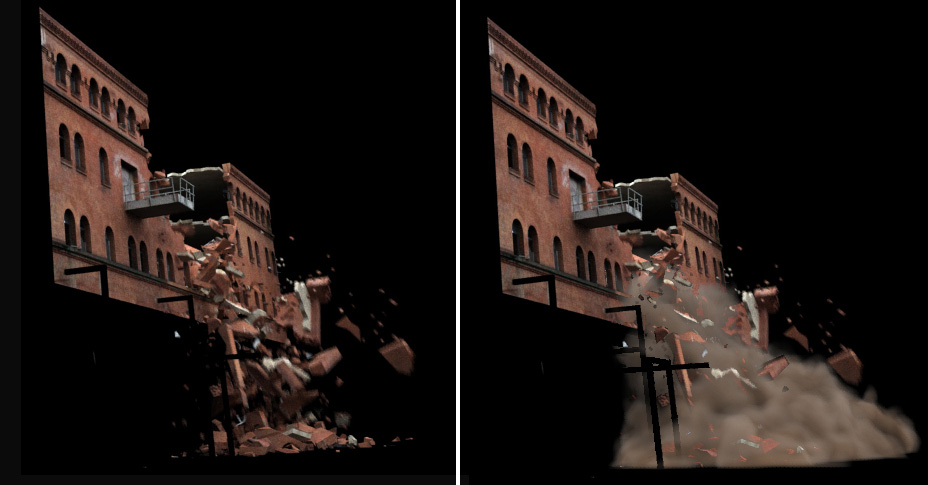
The fluids are rendered using maya software because it was faster. On the pass of rendering fluids everything other then fluids was set to Use Background shader.

Final Comp

Putting it all together, adding the rendered wall collapse with the fluid render on top. After all this a slight color grade to match to the original plate and a overall addition of noise.

Shot Breakdown


About the Author

Hi everyone my name is Ivan Khmel. 3D generalist currently living in New Zealand. Originally my study was in illustration , photography, film making and 3d animation. And for the last 7 years I have been working as a generalist 3d artist in the games industry. As of a year ago I have taken up a personal hobby of learning Realistic Visual Effects and am currently working as VFX artist in a iPhone game development studio, which gets me dealing allot more with 2D animation, sprites particle effects and UV scroll animation.
You can see my website here

www.ivankhmel.com


Westminster Abbey Cg destruction

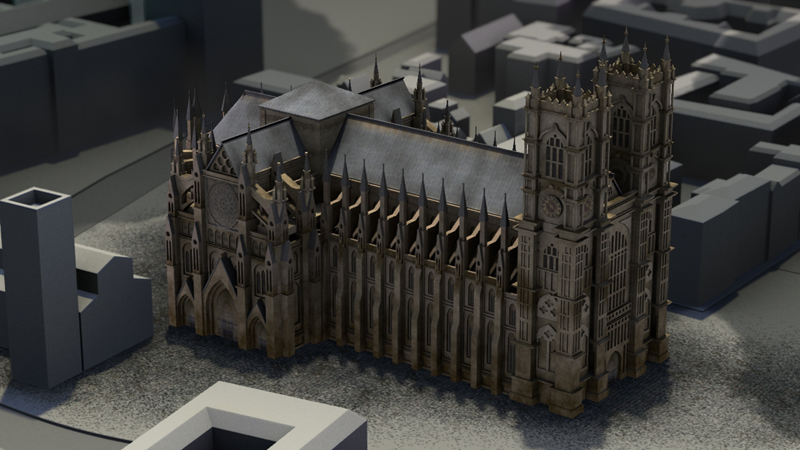
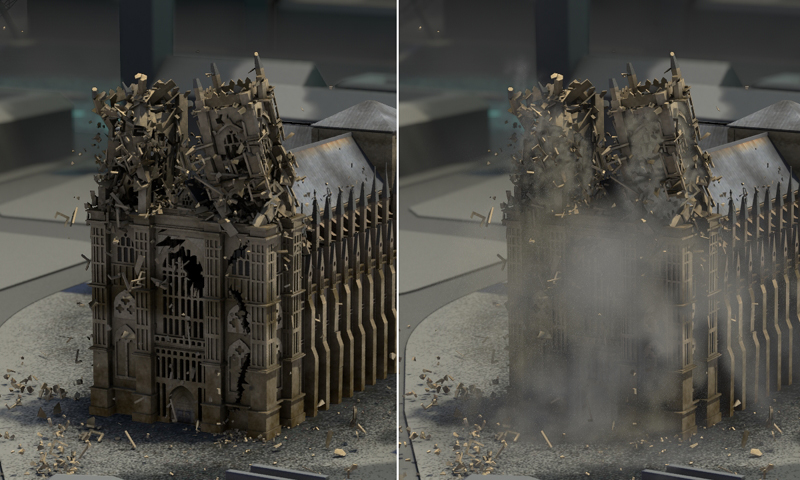
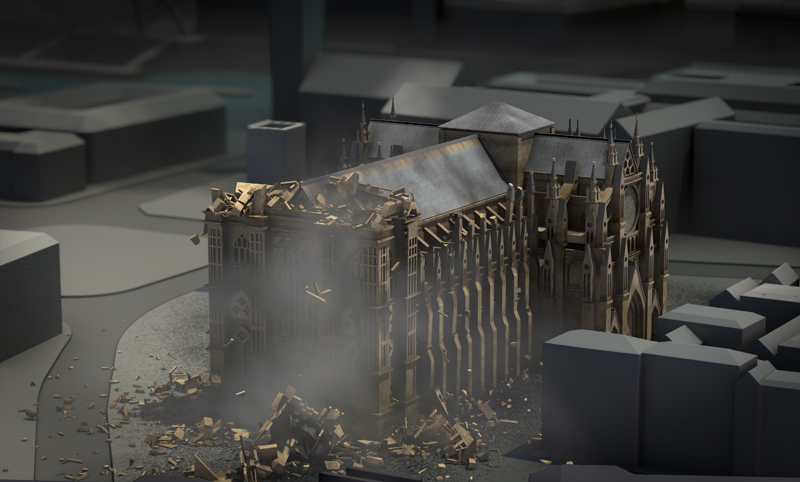
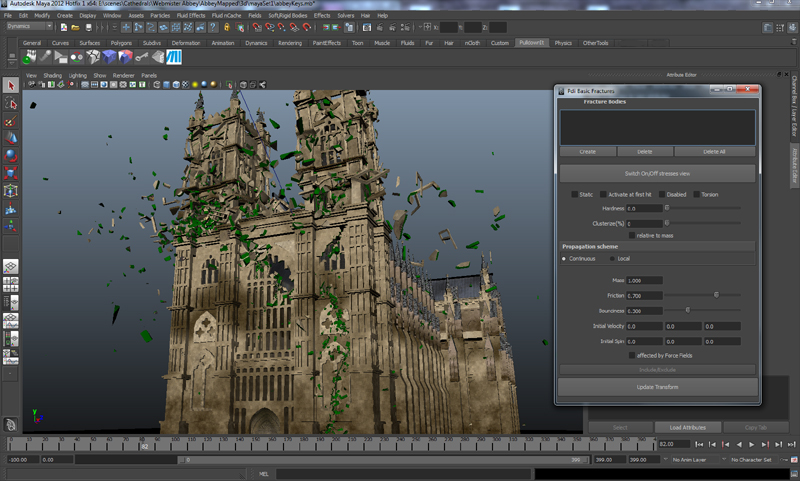
At Thinkinetic  we enjoy to destroy ancient buildings digitally :), this time was the turn of Westminster Abbey in the heart of London, destruction was integrally done in Maya using Pulldownit plugin and Maya fluids, in this review the team explain how we made it.
Shatter & Destruction

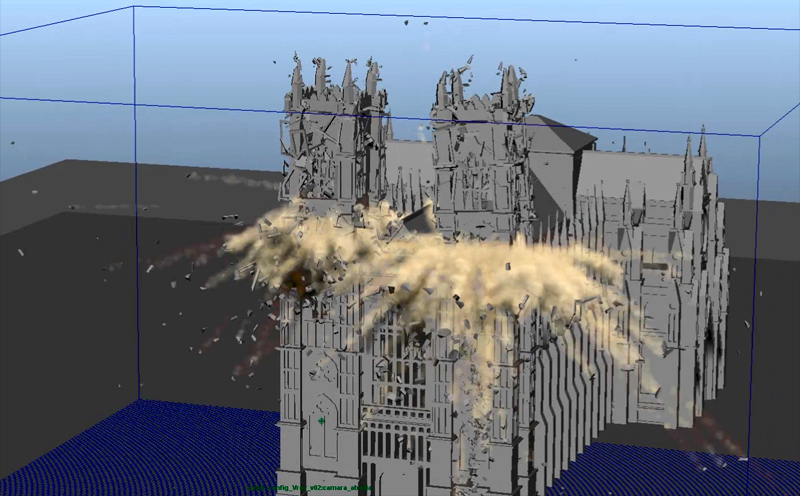
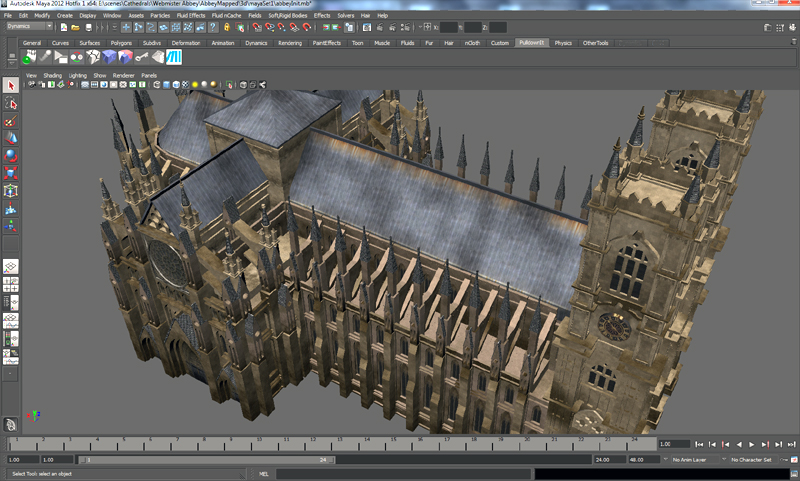
Our Abbey model was about 57000 faces, not too much really, but it wasn’t a single mesh rather  was made of about 1000 different objects; walls, columns, beams, turrets, windows, hallways, roofs, buttresses,.. everything was made of  independent objects, the first thing I did was checking all objects and close  those which were open to shatter them without artifacts. We wanted a large number of fragments for the  abbey destruction, but keeping it below 5000 shards, because above this  Maya viewport start to work much slower and also PDI dynamics takes longer to compute.

For creating the long crack over the front wall I used path-based style, drawing a spline over the surface and shattering the wall in about 1000 shards, most part of the fragments would belong to the towers though, so we set a count of 1500 shards each one, however the towers were made of many different objects, some of them were large as walls and columns and needed  more fragments while many others as trimmings were very little and needed just a few cuts. I grouped all large objects in one layer to shatter them with about 32 fragments per object  the selecting little ones to shatter them in about 4 fragments each one, after that there were  still some large pieces, I reshattered them taking care of not surpassing the 1500 shards count per tower, I used uniform style for all cuts. Finally I shatter the battlements row on the right side using uniform style with about 500 shards for all of them.

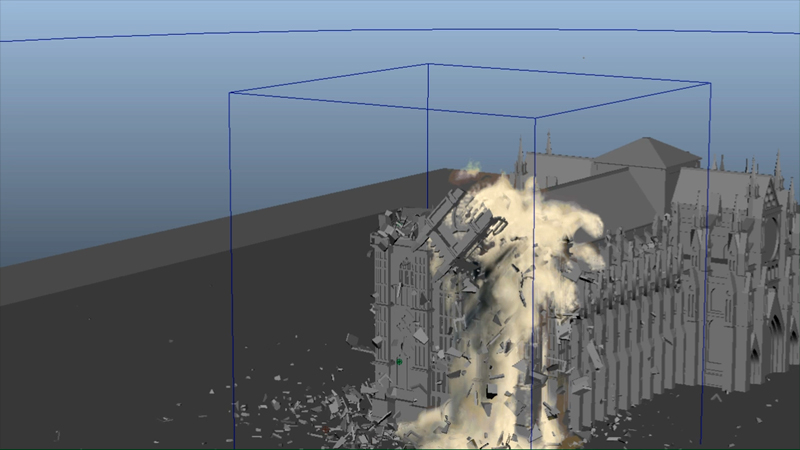
Destruction work was huge in this set so schedulled in three stages, the wall crack, towers destruction and battlements row collapsing. In order to save computation time, wall crack was computed first alone, then baking keys and removing all pdi data to start with a clean scene for the towers destruction, I set everything to convex hull and activate at first hit also create some clusters of fragments using fracture bodies, I placed a volume axis field for each tower near the clocks, animating magnitude to make the towers explode at different frames. In order to save performance I wrapped the abbey with some boxes set as static to make the fragments collide with it in place of using the original geometry, PDI took around 25 min to compute dynamics for near 3000 fragments, quite impressive. After the destruction was done, I bake keys and remove pdi data again before starting with the battlements collapse.  I started shattering the whole row of turrets with uniform style, then creating  a fracture body for all fragments adn using Pdi advanced fractures to make the turrets collapsing sequentially at diferent frames, I tweaked break energy several times until getting the desired look.

Maya Fluids Setup

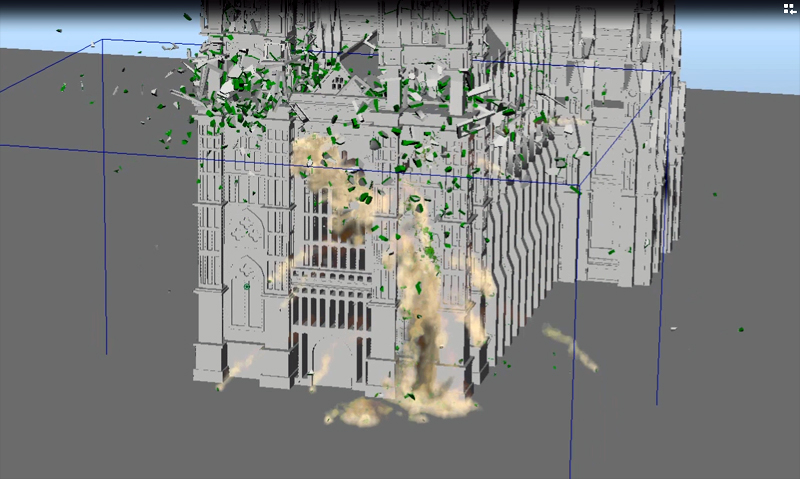
My goal was to simulate dust and smoke using Maya fluids, and integrate it with the destruction previously done using Pulldownit plugin, first I had to decide from which fragments to emit, also I created some additional objects , making them invisible, to emit from. Once the emitters was set, I made a sketch of the moments when the objects would start to emit, finally I divided the task into 3 phases, the main wall crack, towers exploding and towers collapsing.

I modeled and object following the shape of the wall crack and split it in two to create an emitter at the first frame an another one some frames later, I chose to emit from surface and set keys for buoyancy  and particle rate in the emitter  so It emits for some frames and then progressively disappears. Additionally I combined some of the flying fragments to emit from them as well, in this way I had to create only one emitter for all of them at once.

Finally I set the ground and some parts of the structure as passive so the dust will collidewith them, leaving some parts unassigned so the dust could pass through it.

For the towers explosion I combined some of the flying fragments in a single object to emit from them, I did the same for several clusters of fragments of both towers, I had to set a high resolution for the containers, between 120 and 250 cells, because otherwise the smaller fragments would emit intermittently, I wanted the fluids to look like dust, the main difference between dust and smoke is dust tends to drop while smoke tends to rise, so I tweaked bouyancy and density of the emitter to get dropping wakes of fluids, finally I set keys for emission at different frames for both towers as I wanted them to explode with a delay.

The last stage was the collapse of towers, it was more difficult to be done, fragments didn’t fly away neither were falling smoothly, instead they were dropping a bit then stopping then dropping completely, I had to key the bouyancy, density and turbulence of the fluids so it started lighter and smoothly and when the tower fall completely I increased density and turbulence to speed up its motion and make it look more chaotic.
The original model was too complex for using it for collisions with fluids, so I modeled a proxy-object with the overall shape of the abbey, setting it to passive for making fluids collide;. I created again one container per tower in order to control fluids independently for each one, those containers were of high resolution as they had a long path towards the  ground, and extending quite a lot later over it. To create the feeling of the dust coming through the walls I emitted from inner fragments only.

Maya Fluids Render

Before going into render I cached all fluids to can distribute later the task in several computers. I order to integrate fluids passes with the rest, I created 3 render layers, one with the fluid alone, another with the fluid and fragments in alpha channel, and the last one with the shadow of the fluid projected over the ground. I used Maya software for the render layers and Mental ray for the shadow pass, per frame render time was quite long due to the high resolution of fluids. I used a ramp from white to dark beige for fluid density, and a couple of maps in texture and opacity;  there was only a directional light in scene so to prevent from the fluid looking too dark in hidden areas I added a fake lighting for it using ambient light parameters.

Shading & Texturing

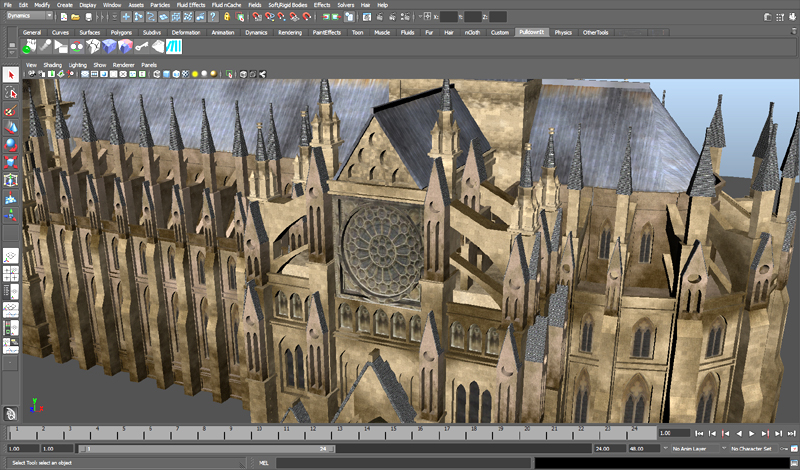
The model counts with 10 different textures made from pictures of the real building,  taking parts of walls and windows pictures first thing I did was making seamless textures from them, after that dirt and wet traces were added for getting the look more realistic and gloomy,

We haven’t real pictures of the roof on a top view, so I decided to apply it a texture made from 4 different bitmaps of rusty and wet metal, I composed all of them in a single image adapted to the geometry of the model.
Although the environment around the abbey is only sketched, we wanted the ground to appear like burned and wasted so I made a noise mask for the ground composing different kind of stones and adding dust and burn filters.
The textures were applied using an unwrap modifier for the ground, roof and main walls, using a 6-sides mapping for the rest of the objects, always having in account the seam with nearby textures, really a surgeon work.

The abbey is featured in a realistic way while the environment is just conceptual, in this way the church clearly stands out from the rest, there are 17 lights in the scene, direct light is projecting a skewed shadow affecting buildings smoothly, ambient light affects everything though, a few lights are placed inside buildings around and behind the abbey to highlight the main model.

Render & Composition

Rendering was distributed  in 32 passes, environment and Abbey in different layers always, we needed another layer with 3 passes for gathering the reflective light of the Thames River behind. Shadows were rendered in two steps with AO and direct channels mixed to give some weight to the scene, there are some mist passes and finally Zdepth were balanced in composition to get more depth of the scene view.

it took 5 days to render 32 passes of 500 frames each one, in a few computers using png format. Postpro was done using color correctors and RGB masks, using 3 reference frames only for tweaking colors and shadows to enhance the abbey destruction, applying the result to all frames after that. Dust passes were composed balancing the alpha channel for cutting down the density and noise levels, making in this way the flying fragments more noticeable however we wanted to still keep the appealling look of dust clouds, for getting this effect I tweaked contrast level until getting the desired look between fragments and dust.

Credits:

Shatter & Destruction
Esteban Cuesta
https://vimeo.com/user1988932

Maya fluids setup & render
Roberto Martin
https://vimeo.com/user5582471

Lighting, Texturing, Shading & Composition
Pedro Ivan de Frias
http://www.pytonproducciones.com/


Atomium collapses!

No worries, Atomium building is still there ;),  it is just a great CG  job by our friend Przem Sacharczuck using Pulldownit plugin in Maya. He kindly explain some details about production in this article.

http://vimeo.com/45337990

Well, Im not a theoretician about CG effects and instead talking, I want simple doing it!
I promise to write something about this video,  I`ll try to be brief.
This project its my personal challenge, last season I was  almost full time spending for testing wide range of simulations so called VFX. Im a fan of all present visual effects in movies, they are improving very fast in last years. I like to know how effects was made, all workshops and making-off`s are very helpfull specially for a begginer in the field.

Actually im training on Autodesk Maya, it is  an usefull software able to almost anything in 3D,  sadly Maya built-in shatter doesnt work  so Pulldownit plugin is a powerfull add-on to Maya for dynamics effects.  In last year I was looking for good plugins, but not many working as I wanted, some plugins generated very poor, unnatural shards, some others have issues when computing dynamics. I find Pulldownit is the best destruction tool for Maya so far, it is fast and stable and  what is interesting Pdi offers ways to make different ways of breakings, as wood, glass and concrete, it is very flexible for every kind of destruction needed!

About this Atomium project, I prepared it in few ways:
First of all- Im decided to make camera tracking to get more realistic result for scene- environment. I find it getting better result than building all scene from scratch, I needed  also some tools for motion tracking & camera tracking. Softwares which offers that possibilities are Matchmover, Boujou and CameraTracker. For best tracking and to avoid any issues in quality of recording scene, this was taken with Canon EOS mkII in full HD quality.
The rest of the project I made mostly In Autodesk –Matchmover, Maya and After Effects for final compositing and color correction.

Finally this scene tooks  me quite a lot of time to be done, about Pdi,  I had to simulate and check several times for the best way of simulation. About Pdi simulation in Atomium I made 3 levels of shards, meteor, top of Atomium and bottom level. Finally I used advanced Pdi fractures for adjusting breaking resistance in diferent levels.

The rest of effects in Maya also tooks me some time, especially make the cloud blasts. Maya fluids needs lots of Ram and fast graphic card! This scene have two fluid containers which working separately. 1st res. is about 70×3, and for shards very dense about 100x150x70. The flying meteor at the beginning of the clip was made in box~100x150x70 container with 3 different emitters: fire, burn and smoke, It took me some time to adjust emitters for getting  the final look I wanted for the wake of the meteor.

For now im freelancer and enthusiastically looking forward :)
Enjoy!

Tornado by Roberto Martin

Roberto Martin made this impressive destruction shot for his final Maya course project combining Maya particles, fluids and Pulldownit plugin, he tell us some details of production in this article.

Tornado( twister) shot is my final Maya Advanced course project at Trazos School in Spain. My teacher at Trazos warned me that if  I planned  to do a scene very heavy in terms of  “objects dynamics” then using Maya rigid bodies will be surely painful  because Autodesk has taken centuries without fix or update it and it takes kind of forever to calculate.  My teacher proposed me some plugins which I had seen before in internet, I tried them a little, sadly they were not entirely stable and had a thousand and one parameter to edit, besides I was looking for interaction with force fields like wind or newton, however using those plugins was maybe possible to demolish a wall-brick, but definitively not intended for blowing up a mill or a barn using Maya forces. So I searched Internet and then found Pulldownit , the web-site looked nice so I downloaded the demo version and after some testing I must say t was incredible stable, I’ve got good results very fast so I started to use it.

Regarding the twister itself I made it emitting particles from some NURBS cylinders, the particles moved around the cylinders using simple expressions, just displacing their UV position over the surfaces. After I got the motion I wanted for the particles, I made them emit fluid, the result was good but too uniform., so in order to generate chaos I finally used two different fluids, one of them was controlled by the particles and  have no density,  and the second was more chaotic but binded to the other, in this way I´ve got some control in its trajectory. I used a density ramp and self-shadow attribute to mix both fluids in render.

For breaking the buildings my first idea was to use a Volume Axis field affecting PDI objects, but after doing some testing I couldn’t  get the desired result, then I realized I needed more fields for the tornado effect, one for attracting fragments and another one for spreading them out. As I had near 25.000 objects in scene it was very difficult to adjust fields properly for all of them, so I decided to go little by little, I started with the house, leaving everything else as passive. After getting the house destruction done as I wished, I followed with the mill and then the barn. Finally there were two Volume axis fields for the house destruction and one Vortex and one Newton for the rest.

I made by hand the animation of the truck, because I wanted it to roll and go straight towards the viewer, I animated it independently in a different scene, in this way I avoided all the overhead of the rest of the scene, which was too heavy, then importing the keys into the tornado scene.
I used PDI advanced fractures to set some parts of the fracture bodies more solid and difficult to separate and other much weaker, specially the slates. I set the floor as passive so it doesn’t move, several large thin planks gave me some issues in dynamics, they were crossing the floor or got “hooked” on it, so I had to fix a few keys by hand or simply removing those planks from the scene, the rest went smoothly,  behaves quite real and was completely stable in such a heavy scene.


Roberto Martin is already working in the CG insdustry, looking forward new videos from you Roberto whenever you have time!


LMU Belltower destruction by John Bashyam

John Bashyam and friends made this stunning shot combining Pulldownit plugin in Maya and After Effects, he kindly share some details about production below.

I thought it would be fun to create a video of a meteor hitting the clock
tower at my school. So I went out and took some reference photos, and then
began to model the tower in Maya. Once I was finished, I added some basic
textures and then went out to shoot the actual video. After this, I
positioned the virtual camera in the same place as the camera in real life
in order to get the perspective right.

Now came time for the destruction. I was thinking about using the Rayfire
tool for 3ds MAX, but I figured it would be such a hassle to import my
geometry, run it through Rayfire, bake it, and export it back out to Maya.
That is when I came upon PullDownIt, which would do all of this inside of
Maya. I decided to give it a try, and it worked like a charm.

I selected all of the geometry to be destroyed, and fractured them using
the PDI basic fractures tool (I even further fractured a few pieces so that
I would have some tiny shards). I put a ball in the scene which I was going
to replace with a meteor later through compositing and then ran the
simulation, baked it, and rendered out a .png image sequence.

Next, I went into After Effects, imported my image sequence, put it on top
of my original footage, added some more debris, smoke, the meteor, lens
flare, color correction, and all of that good stuff. Note that it only
switches over to the CG tower upon meteor impact.

Since I enjoy using Maya over any other 3d program, it is so great to have
a destruction tool that opens right inside. PullDownIt does a nice job, but
it would be cool to have some dynamic destruction features (fracture on
impact).

I am currently studying Animation at Loyola Marymount University in Los
Angeles, CA.


www.savageanimation.com

Pulldownit used in John Carter of Mars

We are proud Pulldownit plugin have been used by Cinesite to create some of the stunning VFX in John Carter of Mars, specially the destrution of the Hellium crystal palace by a Tar’s airship during the wedding of Dejah at the epic end of the film, Pulldownit use is featured in Cinefex issue #129 April.

Congratulations to Cinesite artist for his great work.

compo2