Pulldownit for 3d Max 2019

Pulldownit , the destruction plugin, is already available for 3d Max 2019, this update includes also a number of bug fixes you can read in the Pulldownit version logs pages,

Visit Pulldownit version logs

The major additions to 3d Max 2019 are support and editing tools for OSL shaders, a new procedural wood material and booleans operation fro splines similar to those for 3D shapes, this may look like not enough to justify a major version but the new policy of Autodesk is to include new features regularly in software updates, they dit it in Max 2018 with paramount additions like  Max fluids , VR support, new spline tools and important Arnold render updates, so there will be probably interesting features to come in futher updates of Max 2019.

Booleans operation for splines is an useful addition as it is faster and safer to modify a spline with booleans and then extrude it than applying booleans directly to 3d shapes which many times fails to do it correctly.

The new procedural wood material is nice, has quite a lot of controls to adjust the wooden look, like colour, roughness, number of wood rings and shape of the ribbon stripes, but I miss controls to add grime and scratches, just my suggestion for future updates, currently you can get a nice polished wooden look but not an old spoil wood material.

OSL shaders are also worth to check, they are well integrated in the Slate materials editor and the possibilities to create procedural shaders are endless.

Important to mention OSL shaders and procedural wood material are supported by Arnold render and also by Pulldownit plugin so you can shatter objects with these procedural shaders applied perfectly.

Changsoo Eun, 3d artist, has written an interesting overview of OSL shaders in 3d Max 2019 you can read here,

read Changsoo OSL shaders review

And In this video, Zap Andersson from the 3ds Max rendering team explains clearly how to use the new Advanced Wood material.


CAR Render Challenge 2018 by Hum3D

challenge_car_survival

Thinkinetic is proud sponsor of this new “Car Render” challenge by Hum3D.

3D art challenge for the best car in Post-Apocalyptic style. You can choose any related topic from zombie survival vehicles to the Mad Max universe – we don’t limit your creative ideas.

You can summit your work until May 29, 2018.

Pulldownit Pro license is one of the valuable prizes and there are plenty of them, those interested can check rules and prizes here:

Visit Challenge Home Page

Pulldownit 4 for Maya released!

Banner760x400-PDI4

Pulldownit 4 for Maya has been released and comes with several new powerful features you can see explained in the video.

But this release is not only about new features, the whole plugin has been updated and tuned for better performance and usability, there is now one single window gathering all fracture tools and one single window for all rigid bodies stuff, alleviating the burden of many open windows in previous version, new seams view in Shatterit mode and improved performance of fragments selection in advanced fractures, besides fracture solver is around 30% faster and much less memory is needed to cache simulations, and many other little things you surely will notice when using the tool, all of this makes this new release more responsive and with faster iterations when working in Maya.

Below listed the most relevant highlights in Pulldownit 4.

Shatter New Features 

New Adquire Shatter style, new style to transfer a current shatter pattern to another object including animation keys, by using it you can apply the current shatter effect to a version of the model with different shaders applied or to a hi-poly version of the same model.

New Shatter option for using a volume shape as source, now you can use any polygonal shape to constraint the shatter effect to its volume, this is especially useful when shattering based on an impact object.

shatterBasedOnShapeCompoWeb

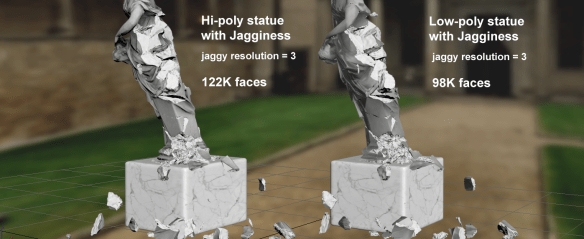
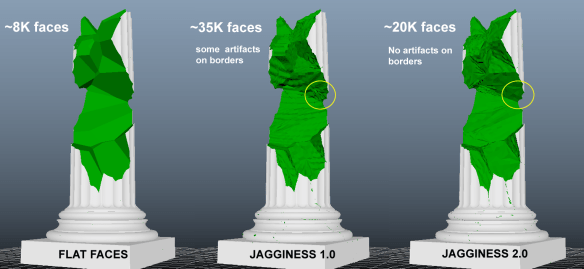
Jagginess( v2.0) independent of tessellation.  New Jaggy method  is independent of the original mesh tessellation, getting much lighter jaggy fragments when the object is hi-poly, and removing the artifacts caused in borders of high tessellated models

jagginess20vs10compo

New soften edges UI parameter for Jagginess. New parameter to adjust soften of jaggy edges to get the amount of roughness desired in inner faces. In addition new soften method removes visible seems on inner borders from previous method.

New option to apply jaggines to broken fragments only,  using this option for non-moving fragments you can apply jagginess only to the areas which has been broken in simulation, getting much lighter meshes for rendering or real time games.

Dynamics New Features 

Speed up Fractures solver 30%, PDI dynamic solver has been very fast since its first version, in this latest release you will experiment faster iterations when working in dynamics.

50% less memory needed for caching simulations. PDI cache is now 50% lighter in CPU memory , that makes massive cached simulations running faster in viewport.

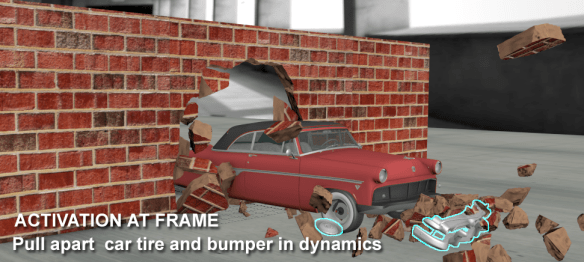
New ability to pull apart pieces of an animated object at desired frame, besides activating rigid bodies at first hit you can now set the frame when they become active, this works also for rigid bodies linked to an animated one.

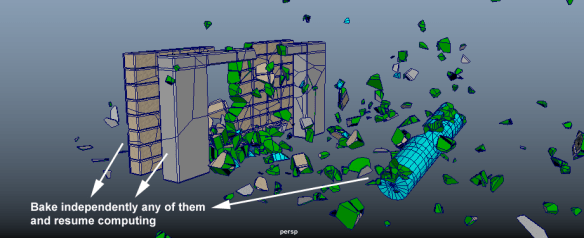
Added a bake selected option, you can now bake keys only for selected fracture bodies, letting the rest to continue being driven by simulation, baked fractures can still interact with other objects by setting the animated fragments as kinematic bodies.

baleSelected

Improved performance of fragments selection in advanced fractures, selection of individual fragments in viewport is more responsive, especially when Stresses View is enabled.

Cluster break energy is now independent of body mass/scale, break energy dependence on body mass made cumbersome to understand its behaviour as the same threshold will trigger a blast or not depending on the size of the object, because of this we have removed this dependency and the threshold you set will be valid forever independently of mass or scale.

First hit bodies which eventually doesn’t move are excluded from caching and baking, fracture bodies set as “break upon impact” only caches its broken or moving parts and fragments set as static aren’t cached at all , making in this way the size of PDI files smaller specially when you are collapsing only parts of large structures such as buildings.

Read the full list of fixes in the Pulldownit web site version logs

Evermotion Challenge 2017 Winners

compoWinners

Evermotion challenge 2017 “ The Perfect Getaway” has ended, as sponsor of the competition Thinkinetic is proud to gift a Pulldownit Pro license to the winners, congratulations to all of them.

Take a look to the winners works and best finalists in the official announcement:

https://evermotion.org/articles/show/10951/evermotion-challenge-2017-winners-announcement-

Car Render Challenge 2017 Winners

compowinners2017

Hum3D car render challenge 2017 has ends, as sponsor of the competition Thinkinetic is proud to gift a Pulldownit Pro license to the winners, congratulations to all of them.

Take a look to the winners works and best finalists in the official announcement:

Car Render Challenge 2017 Winners

Besides Keving Boulton the 1st place winner explains how he used Clay Maker in 3d Max to model his awesome car:

Modelling Wiesmann GT MF57 in 3D Max

War Reign Cinematics by Lee Soo In

Lee Soo In, FX artist at  Penxel, has uploaded several great cinematics and breakdown for the game War Reign using extensively Pulldownit plugin for destruction effects.

Lee Soo some words about his experience with Pulldownit plugin:

I’ve been using a lot of fragments tools. Among all the advantages of the PDI plugin,
the credibility of the results is very high and during the simulations access to objects is very easy.

Since we’ve done a lot of work with PDI, we’ve been able to do it very
conveniently.

“Bake simulation” is a good feature. Because I can change the timing and
speed freely , many times It is convenient to perform detailed tasks with keyframe modifications.

below another great War Reign cinematics with some PDi destruction effects, and lots of smoke using Fume FX and Krakatoa,

Thank you for showing those great  videos  and your testimonial Lee.

Tips & Tricks: Damaging without collapsing

When doing a destruction shot many times you want large structures like buildings to be destroyed partially while standing or you may want a dynamics object to be damaged only in the impact areas while maintaining its overall shape and trajectory. Let’s review the different options you count in Pulldownit plugin to break objects in localized areas only.

First you have to generate more density of fragments in the areas more likely to break using local shatter style, this will increase the quality of the destruction, after that create a fracture body for the object, there are two different cases:

Case of a static object, like a wall or building; after creating a fracture body for the object:

  • Set the fracture body as Static.
  • Set Activation->Breaks upon Impact.

Play the simulation, if there are still fragments which moves and you want them to stand,

  • In Advanced fractures set the fragments you don’t want to move to static.

Play the simulation modifying Hardness value until you get the level of damage you want.

wallBrokenV3Text


Case of a moving object, like a flying stone, airplane or whatever object is moving through the scene and eventually collides and breaks; after creating a fracture body for the object:

  • Set Clusterize parameter to 0.0
  • Change to Local Propagation scheme.
  • Set Hardness to 10.0

Play the simulation modifying Hardness value until you get the level of damage you want.

stoneBroken

Pulldownit for Maya 2018

Maya 2018 has been finally released by Autodesk, and Pulldownit plugin is already available for it, you can download Pulldownit Pro for Maya 2018 from the users area if you have licensed the plugin or download demo versión  from the web site in case not.

Apparently legacy viewport has been removed from Maya 2018, you can enable it again by setting the environment variable MAYA_ENABLE_LEGACY_VIEWPORT, anyway Viewport 2.0 seems to be the future for Maya so Thinkinetic has made an effort to fix several issues of the plugin when using it in VP2 and now it is fully supported, along it other annoying issues reported by users has been fixed in this latest update ( 3.8.8) you can read the full list of fixes in the version logs page of the Thinkientic web site,  besides you can review latest features and demos of Pulldownit 3.8 here:

Pulldownit 3.8.6 new features

Maya 2018 doesn’t count with overwhelming new features but with quite a lot of fixes and useful improvements; this time Autodesk has preferred to fix  several issues which sadly were doing  Maya 2017 not usable in production  and improve  tools and solvers already present like the UV editor, Bifrost  or XGen, the Maya built-in hair solver, which is a great tool indeed and now has new useful capabilities as the Clump modifier, better  interactive grooming and ability to make hair and fur collide physically with other objects in the scene.

And don’t forget the new versions of Arnold and MASH included,  these plugins  are developed by external teams and now count with new features, here a pretty impressive demonstration by Steven Roselle about rendering a dense forest of 10000 trees with millions of polygons  combining  Arnold and  MASH capabilities in Maya 2018.

Export PDI dynamics from Maya to UE4

In this excellent tutorial Esteban Cuesta shows us how to destroy a pile of tubes using Pulldownit in Maya and then export it to Unreal Engine 4, but not only this, he also teaches us how to trigger the destruction in UE4 when a bullet hits the model during the game. Exporting broken models and dynamics to UE4 works with either Pro version and free version of Pulldownit, just follow the tutorial to learn how to add quality destruction effects into your game.


thank you Esteban for the amazing tutorial