Thinkinetic sponsors 12th annual 3DModels competition for the best car render, This year’s edition is titled “One Car Challenge”, because everyone starts with the same base model. Each participant gets the same 3D car, you have to add the environment and can modify ithe base car as you like.
Pulldownit Pro license is one of the valuable prizes and there are plenty of them! those interested can check rules and prizes here:
In this polished tutorial Esteban Cuesta show us how to destroy the scenery using Pulldownit plugin in 3ds Max, he explains how to shatter and dynamically destroy all objects colliding with an animated model along its ride through a narrow tunnel, add roughness to fragments and bake the simulation, worth to check out!
The Death Tyrant Model showed in the tutorial has been created by Andres de Mingo, you can find an awesame 3D printed version here:
In this quick tip Esteban Cuesta shows us how to easily delay the start of a crack of modify its strength progressively using latest Pulldownit plugin in Maya. As you can see it is just matter of setting animation keys for the cracker multiplier parameter and you can undo it or modify the crack strength at your ease, simply by setting new animation keys.
Thinkinetic sponsors 11th annual 3DModels competition for the best car render, Pulldownit Pro license is one of the valuable prizes and there are plenty of them! those interested can check rules and prizes here:
3DModels “Steampunk: New History” winners announced!, congratulations to all of them. As sponsor of the competition Thinkinetic is proud to award with a Pulldownit Pro license to the winners.
Take a look to best images and interviews with winners in the official announcement:
Andres de Mingo made this nice shot, an animated character breaking some skulls and then 5K skulls falling over it, done in 3d Max using Pulldownit plugin for all dynamics effects.
Breaking the skulls on the cave floor
All skulls are set as static convex bodies to be activated at first hit, the hammer is set also as a kinematic convex body to speed up computation, the floor of the cave isn’t flat so I had to set it as a static mesh body to can use its real shape in collisions, also I made a couple of large boxes on both sides as barriers to prevent skulks rolling out of the camera view, those barriers where hidden in render, some skulls breaks when being hit, they were shattered in around 120 fragments each one combining both uniform and local styles, and I set them as static “first hit” fracture bodies, after playing the simulation with PDI the skulls reacted to the hammer impact and got broken nicely at a very fast computation rate.
Making The skulls stack
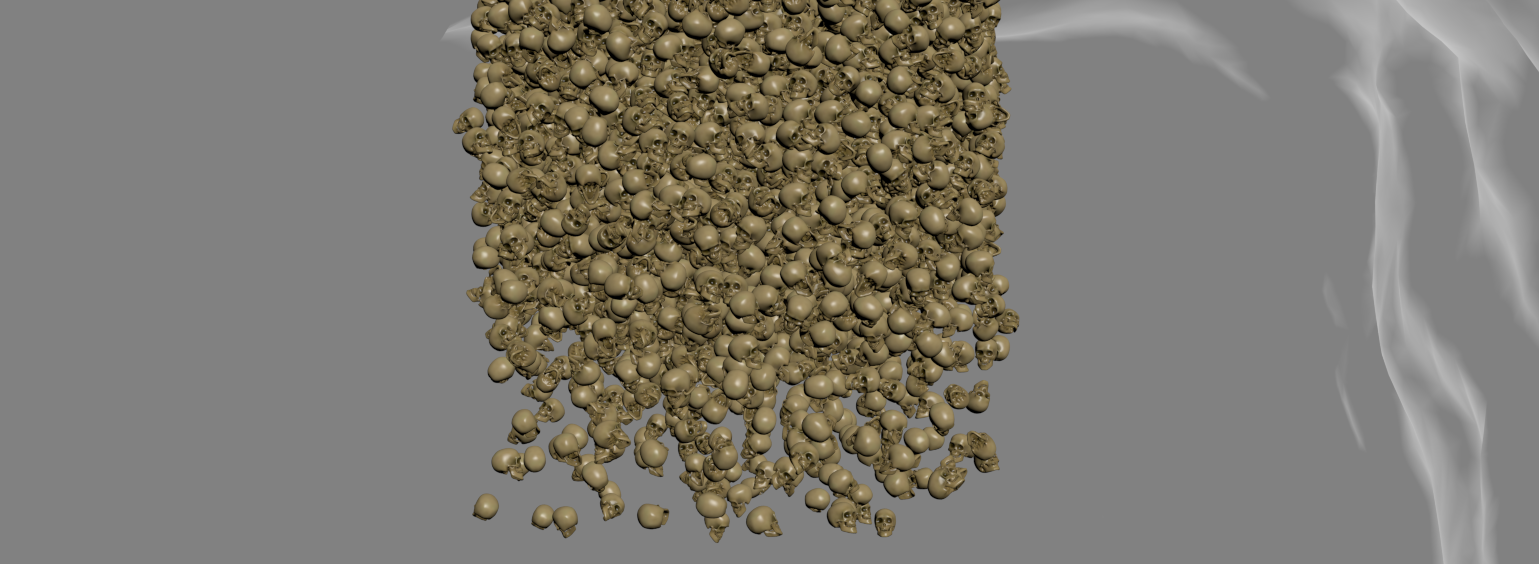
Starting with a single skull I created 5000 instances using the make array tool in 3ds Max, then I set all of them as PDI dynamic convex bodies, however the stack was completely uniform, like a box of objects, to get a more natural look of the skulls falling I set random initial velocities for them using PDI and compute a few frames before the skulls where visible in camera, so when reaching the stage they were nicely disordered.
Destroying the Skeleton
I set the animated skeleton as a kinematic body and create 3 additional falling skulls hitting it in the head and shoulders at specific time according to character animation, but the most tricky part of the shot was destroying the skeleton, for this I created a frozen copy it, I set it as a PDI convex body and hide the duplicated skeleton, then when the stack of skulls reached it I replaced the animated skeleton for the dynamic one and this made the trick, the skeleton parts were falling while being hit and covered by the skulls.
Conclusions
You can find the skulls, skeleton and other cool models by Andres de Mingo in
Pulldownit 5.8, is already available for Maya 2025, this version includes instanced shapes supported in the core solver allowing to create hundreds of instanced rigid bodies almost instantly and a 20% faster simulation with instances, along with several fixes you can review in the version logs page.
Maya 2025 itself brings a number of updates in animation, modeling and rendering. Originally introduced in 3ds Max , Smart Extrude is now available in Maya, this powerful mesh modifier lets to interactively extrude faces in the viewport and eliminates the need to manually repair geometry, you can cut faces partially or even make holes in the model in one run.
Maya 2025 brings several useful updates in animation, a new deformation widget has been added to the Attribute Editor which lets quick review deformers and topology modifiers that affect an object, Bake Deformer now allows to set a custom range of motion for Poses/keys aside other various customer requests included.There is a new Motion Trail Editor with an icon shelf for faster access, this new feature gather all Motion Trail-related utilities in a single spot, also the Dope Sheet has been reworked for a quick, intuitive way to understand, manipulate, and adjust animation timing.
USD plugin update to version 0.27 with the ability to bulk load and unload multiple prims, and the LookdevX editor introduces support for the MaterialX data format alongside USD shaders.
In the simulation field Bifrost now integrates the classic Maya Ocean Simulation System but with several improved features, as new nodes for simulating ocean waves with foam.
Finally Arnold render updates to version 5.4.0 with faster GPU rendering and MaterialX support.
OnMars3D review and test many of Maya 2025 new features in this nice video:
3dModels “Steampunk: New History” Challenge has started!
“Let your imagination run wild and create a unique piece that captures the essence of the steampunk genre, which combines Victorian-era aesthetics with steam-powered machinery and retro-futuristic designs”
Pulldownit Pro license is one of the valuable prizes and there are plenty of them! those interested can check rules and prizes here:
NOTE: Users of Puldownit 5.x cloud floating licenses must install this update to can connect to the licenses server.
Pulldownit 5.8 is here! this new version introduces a Fast Stacking & Deactivation solver which computes up to 4 times faster in massive destruction scenes, in addition instanced shapes are now supported in the core solver allowing to compute thousands of hi-poly objects in dynamics faster and with much less memory overhead.
Animated characters computes faster when colliding and fracturing other objects, and a new Anim Speed Multiplier parameter allows to fine tune the strength of the impact between animated objects and dynamic ones, besides cracker multiplier can be synced to node visibility allowing to decrease or disable the crack effect at any chosen frame.
Wind & Gravity Fields decay is now considered as exclusion volume, animated decay is supported, getting finer control over force fields affecting rigid bodies and fractures.
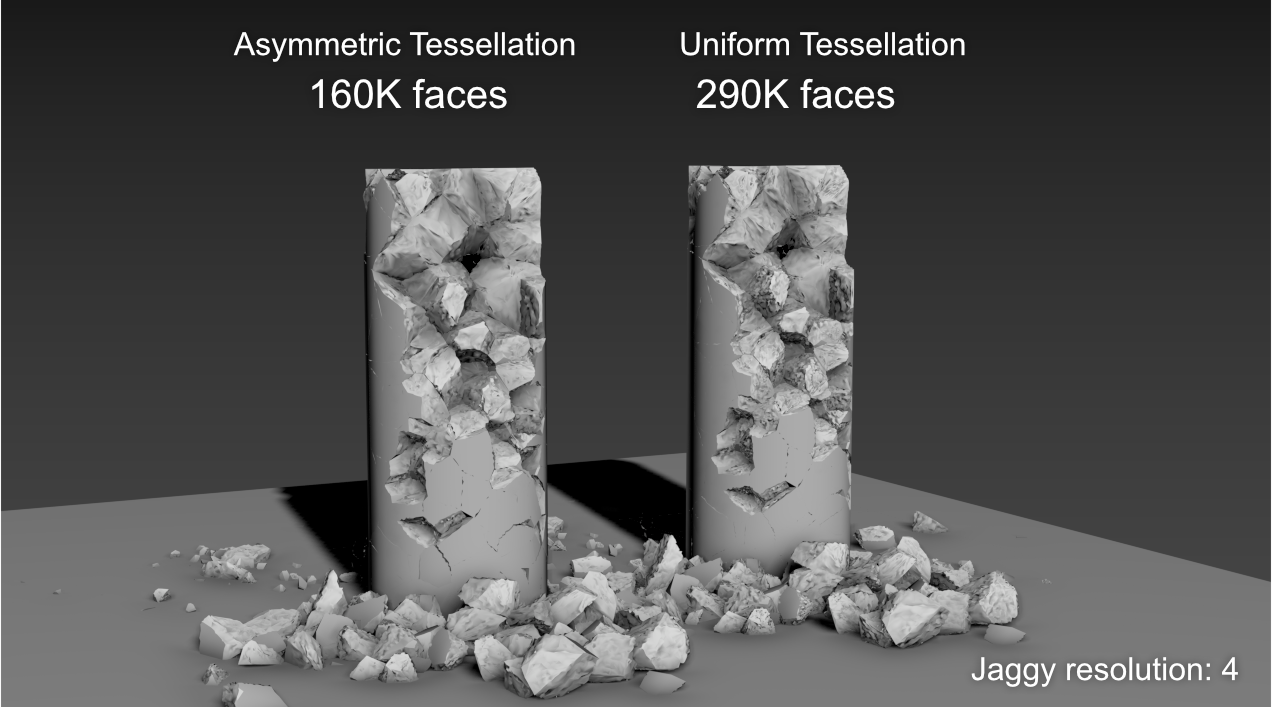
Regarding shattering, PDI Jagginess gets a new “Asymmetric tessellation” mode which generates nearly 50% fewer polygons with an appearance of rough faces close to that achieved using Uniform Tessellation.
There are also useful improvements to the UI, you can add jagginess to all PDI fragments in scene with one click, and there is a new option to set all dynamic values to default for selected rigid bodies.
Last but not least we have fixed quite a few annoying issues from previous version, making the tool more predictable and reliable than ever. You can review below all performance and usability improvements, and you can check the whole list of fixes in the Pulldownit version logs page
Licensed users can access already Pulldownit 5.8 from his account and there is a demo version for 3ds Max 2024 in the Thinkinetic web site.
Shatter New Features
New Jagginess mode “Asymmetric tessellation”, this new tessellation mode generates nearly 50% fewer polygons than the Uniform one with a similar appearance of rough faces.
Dynamics New Features
New Fast Stacking & Deactivation solver, scenes involving hundreds or thousands of fragments in dynamics now computes up to 4 times faster, besides this new solver highly reduces drift motion of fragments resting in the ground.
Instanced shapes supported in core solver, optimized support for instanced shapes in dynamics, allowing to compute massive simulation of thousands of objects faster and with less memory overhead.
Improved performance in fracture against animated bodies, animated or deforming objects now computes faster when colliding and breaking other objects, besides user can easily control the strength of the impact with the new anim speed multiplier parameter.
Wind & Gravity fields range as exclusion volume, rigid bodies and fragments outside of the field decay area are not affected, animated range is supported.
UI Enhancements
New user parameter Anim Speed Multiplier, allowing to easily control the strength of the impact between animated objects and dynamic ones.
New ability to sync cracker multiplier to node visibility, allowing to modify the strength of the crack effect during the simulation or disable it completely at desired frame.
New option “Add Jagginess to All fragments”, allowing to add jagginess to all PDI fragments in scene with one click.
New Jaggines user prompt, displaying quick info about current jaggy mode and selected fragment state.
New “Fast Stacking” simulation option, user can revert to classic, more accurate, but slower stacking solver by disabling this option.
New UI option “set all dynamic values to default” for rigid bodies.
Pulldownit , the destruction plugin, is already available for 3d Max 2024 , you can learn more about latest features of PDI in this great tutorial by Esteban Cuesta:
3d Max 2024 itself brings quite a lot of new features for modeling, animation and rendering and a high performance boost when working with STL models.
In the modelling field introduces a brand new boolean modifier, contrary to classic compound objects, boolean operations are now managed in the modifiers stack so user can remove or re-order them seamlessly, in addition it can convert the model to an OpenVDB version making the boolean operation more robust and independent of the source topology.Array Modifier introduced in previous version gets a new Phyllotaxis distribution mode for generating spiral pattern as seeing in many natural structures like flowers. The whole Modifiers tab has been ported to QT making it faster navigation and includes a handy search filter for fast selection on the long modifiers list.
The slate material editor has been rewritten using QT making it much more customizable, and besides user can now package several nodes into one single compound for better legibility when working with complex graphs. In addition there is a new Material Switcher node allowing to quickly change the material of an object for fast look-dev workflow
Animation has got also an important update, a new “Transform List” controller allows to add multiple controllers to an object and blend them together, in addition motion paths can now be displayed and adjusted in viewport for all controllers types.
Max 2024 introduces support for the OCIO colour-management broadly used in the animation industry although Gamma workflow is still the default mode, MaxToA now supports OCIO standard as well.
So a noticiable amount of improvements, Autodesk continues strengthen 3ds Max for polygonal modelling and visualization task, though there are some important enhancements for animation this time, hope it continues in the following updates this year.
Eloy Andaluz introduces all of these new features in a great demo video you can review here:









 KineticThoughts