Pulldownit 6 for 3ds Max released

Pulldownit 6 for 3ds Max is here!

This new version of the plugin is focused on fast and easy fractures refinement to get polished destruction effects of your model quickly.

We are thrilled to announce Pulldownit plug-in gets a non-destructive workflow in 3ds Max, allowing to sculpt fractures over the model freely, visually shattering it in the areas you want and computing dynamics right away, or changing the original model position, orientation, scale or shape and all existing fractures will update accordingly, 3ds Max modifiers are supported.

In the same line we introduce a new Edge Fracture Tool to easily chipping inner borders of selected fragments, the tool works in an interactive way, simply selecting fragments in viewport to shatter its edges and play the result, you can recover the original breakage at any moment to start again.

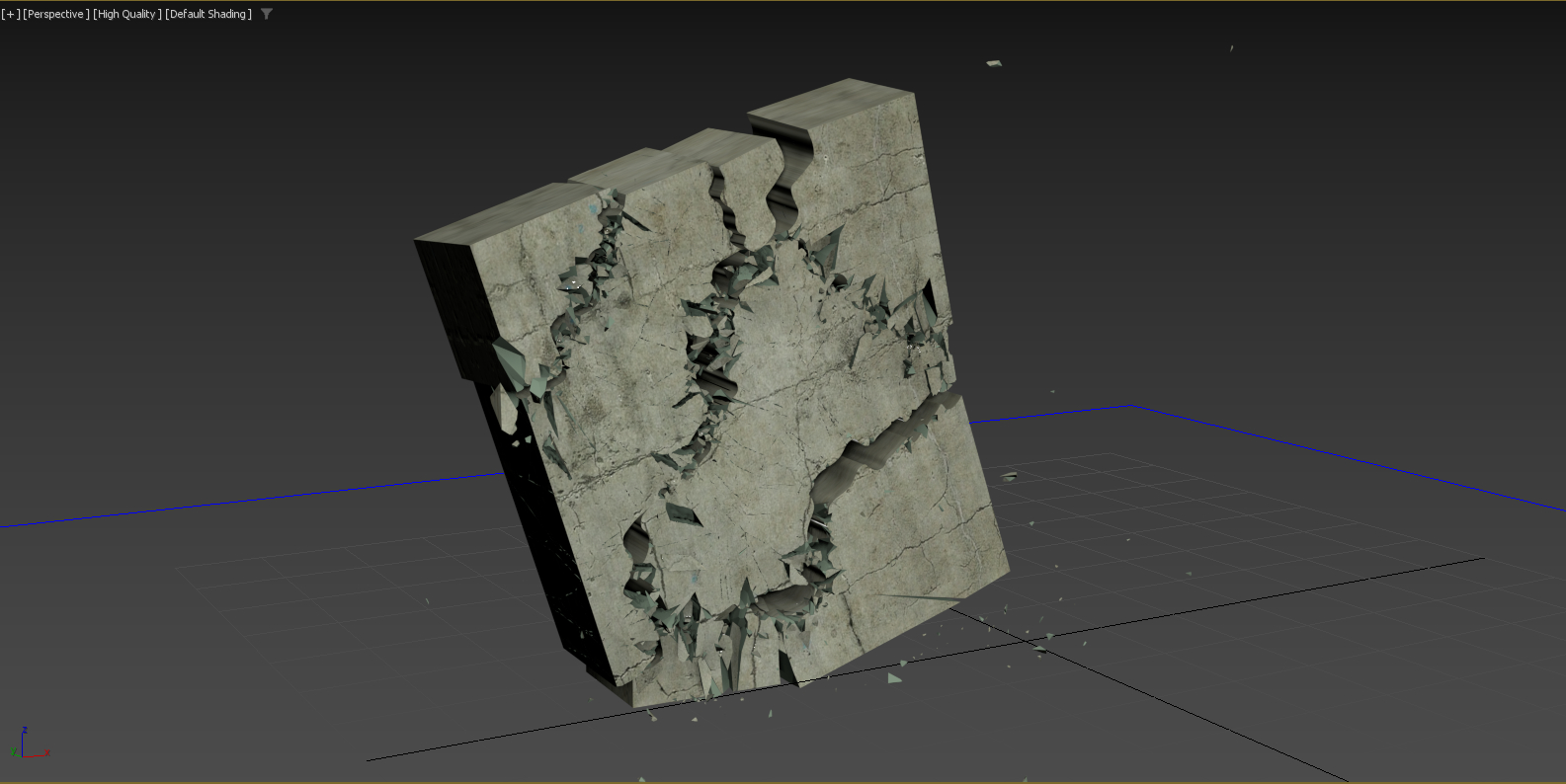
Replace cut material can now be done at any stage of the destruction scene, even after baking simulation keys and it supports jaggy fragments, in addition a different base color is set for the new material created to easily check the fragments affected.

PDI Alembic exporter has been revamped, now it is able to export thousands of objects as a single Alembic mesh in seconds. In addition, PDI auto-loads the Alembic file in the 3ds Max scene after export , you can check it, apply original shaders to it, and if needed recover original geometry nodes just by deleting the Alembic mesh.

There are several other performance and usability improvements you can review below and you can check the whole list of fixes in the Pulldownit version logs page:

Read the full list of fixes in the Pulldownit web site version logs

Licensed users can already access Pulldownit 6.0 from his account and there is a demo version for 3ds Max 2026 in the Thinkinetic web site.

New Non-Destructive shatter workflow, shatter pattern can be modified in any way and recompute dynamics right away, change the original model position, orientation, scale and 3ds Max modifiers are supported.

New Edge Fracture Tool, this new tool allows to visually chipping on inner borders of selected fragments, it works in an interactive way , you can reshatter fragments and play the simulation right away, undo last operation or recover the original breakage at any moment.
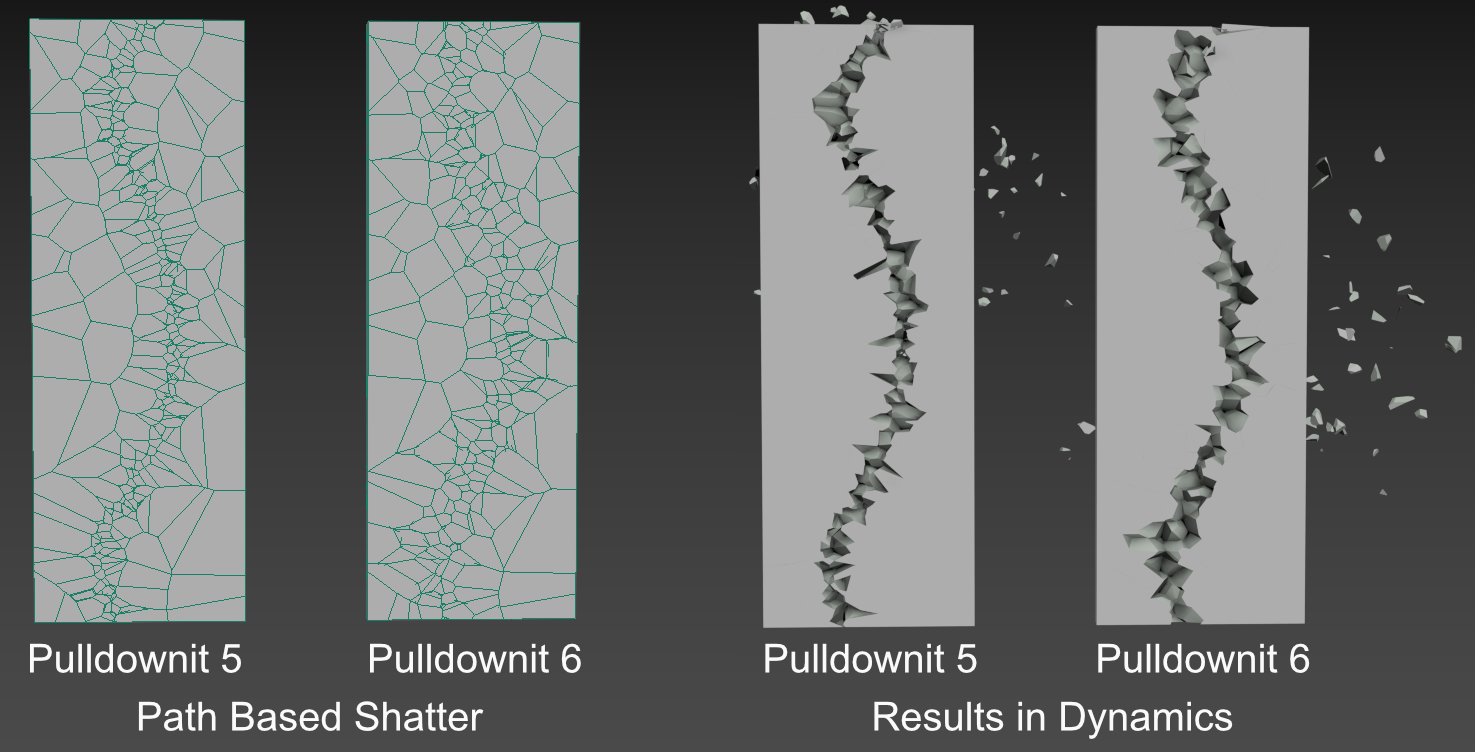
Improved path based shatter quality, path based shatter now generates rounded shards across the path, producing more realistic results in dynamics for stone-like materials.

Auto replace cut material supports jaggy fragments, replace cut material can now be done at any stage of the destruction scene, it affects the selected shatter group only, jaggy fragments and baked fracture objects are supported, in addition it sets a different base color for the new material making the checking of fragments affected much easier.

Improved Clusterize pattern, clusterize parameter now generates nonaligned clusters getting more realistic fracture results, besides falling Fracture Bodies are now forced to break in the area of collision with static surfaces without the need of further adjustment.

Fracture Body “Relative to Mass” now adjust to “hardness”, getting easily more debris in impact areas just by making the model more brittle.

New cluster option “Excluded from Cracks Propagation”, this new parameter forces the cluster to break upon direct collision only, preventing it to be detached in advance because of cracks propagation or force fields affecting the whole fracture body.

New cluster option “Relative to Mass”, enabling this option clusters involving small and large fragments prefers to break in the chipping areas first, this option is now the default for clusters creation.

Alembic exporter 20x faster, export fracture simulation to Alembic now takes just a few seconds even for thousands of objects involved

Cut Material color auto change after Make New, replacing a shatter group material now sets a different color for the new material created so you can easily differentiate it from the old one.

Added “Bake All” option to PDI Simulation tab, this new option allows you to bake all PDI bodies in scene at once, removing all PDI data and letting only animation keys in the scene.

Added progress bar to Alembic exporter.

Tutorial: Destroying the scenery in 3ds Max

In this polished tutorial Esteban Cuesta show us how to destroy the scenery using Pulldownit plugin in 3ds Max, he explains how to shatter and dynamically destroy all objects colliding with an animated model  along its ride through a narrow tunnel,  add roughness  to fragments and bake the simulation, worth to check out!

The Death Tyrant Model showed in the tutorial has been created by Andres de Mingo, you can find an awesame 3D printed version here:

go to death-tyrant-beholder miniature

If you are interested in quality Dungeons & Dragons 3D printed models layerforged unleash New Monsters Every Month!

https://www.patreon.com/layerforged

Case Study: Skulls Temple

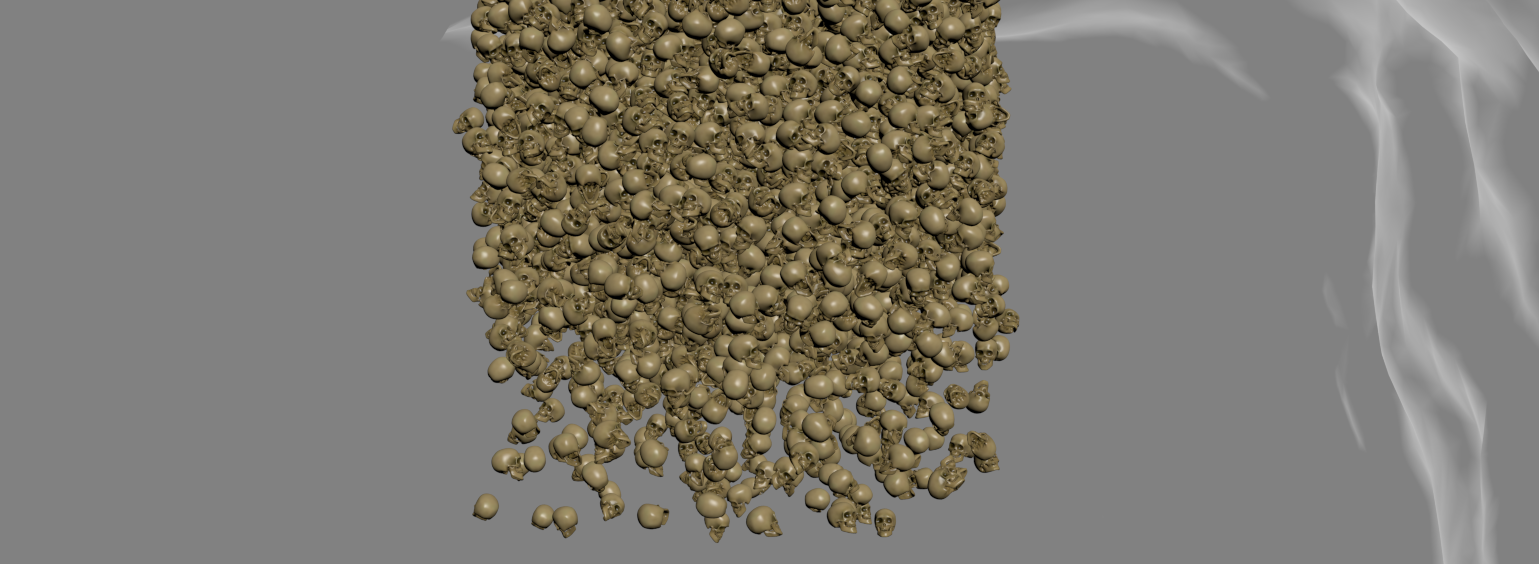
Andres de Mingo  made this  nice shot, an animated character breaking some
skulls and then 5K skulls falling over it, done in 3d Max using Pulldownit
plugin for all dynamics effects.

Breaking the skulls on the cave floor

All skulls are set as static convex bodies to be activated at first hit, the hammer is set also as a kinematic convex body  to speed up computation, the floor of the cave isn’t flat so I had to set it as a static mesh body to can use its real shape in collisions, also I made a couple of large boxes on both sides as barriers to prevent skulks rolling out of the camera view, those barriers where hidden in render, some skulls breaks when being hit, they were shattered in around 120 fragments each one combining both uniform and local styles,  and I set them as static “first hit” fracture bodies, after playing the simulation with PDI the skulls reacted to the hammer impact and got broken nicely at a very fast computation rate.

Making The skulls stack

Starting with a single skull I created 5000 instances using the make array tool in 3ds Max, then I set  all of them as PDI dynamic convex bodies, however the stack was completely uniform, like a box of objects,  to get a more natural look of the skulls falling  I set random initial velocities for them using PDI and compute a few frames before the skulls where visible in camera, so when reaching the stage they were nicely disordered.

Destroying the Skeleton

I set the animated skeleton as a kinematic body and create 3 additional falling skulls hitting it in the head and shoulders at specific time according to character animation, but the most tricky part of the shot was destroying the skeleton, for this  I created a frozen copy it, I set it as a PDI convex body and hide the duplicated skeleton, then when the stack of skulls reached it I replaced the animated skeleton for the dynamic one and this made the trick, the skeleton parts were falling while being hit and covered by the skulls.

Conclusions

You can find the skulls, skeleton  and other cool models by Andres de Mingo in

layerforged

they offer  a wide variety of 3D printed resin miniatures for your modeling projects, role-playing games (DnD, Pathfinder, HeroQuest) and much more.


Pulldownit 5.8 for 3ds Max released

NOTE: Users of Puldownit 5.x cloud floating licenses must install this update to can connect to the licenses server.

Pulldownit 5.8 is here! this new version introduces a Fast Stacking & Deactivation solver which computes up to 4 times faster in massive destruction scenes, in addition instanced shapes are now supported in the core solver allowing to compute thousands of hi-poly objects in dynamics faster and with much less memory overhead.

Animated characters computes faster when colliding and fracturing other objects, and a new Anim Speed Multiplier parameter allows to fine tune the strength of the impact between animated objects and dynamic ones, besides cracker multiplier can be synced to node visibility allowing to decrease or disable the crack effect at any chosen frame.

Wind & Gravity Fields decay is now considered as exclusion volume, animated decay is supported, getting finer control over force fields affecting rigid bodies and fractures.

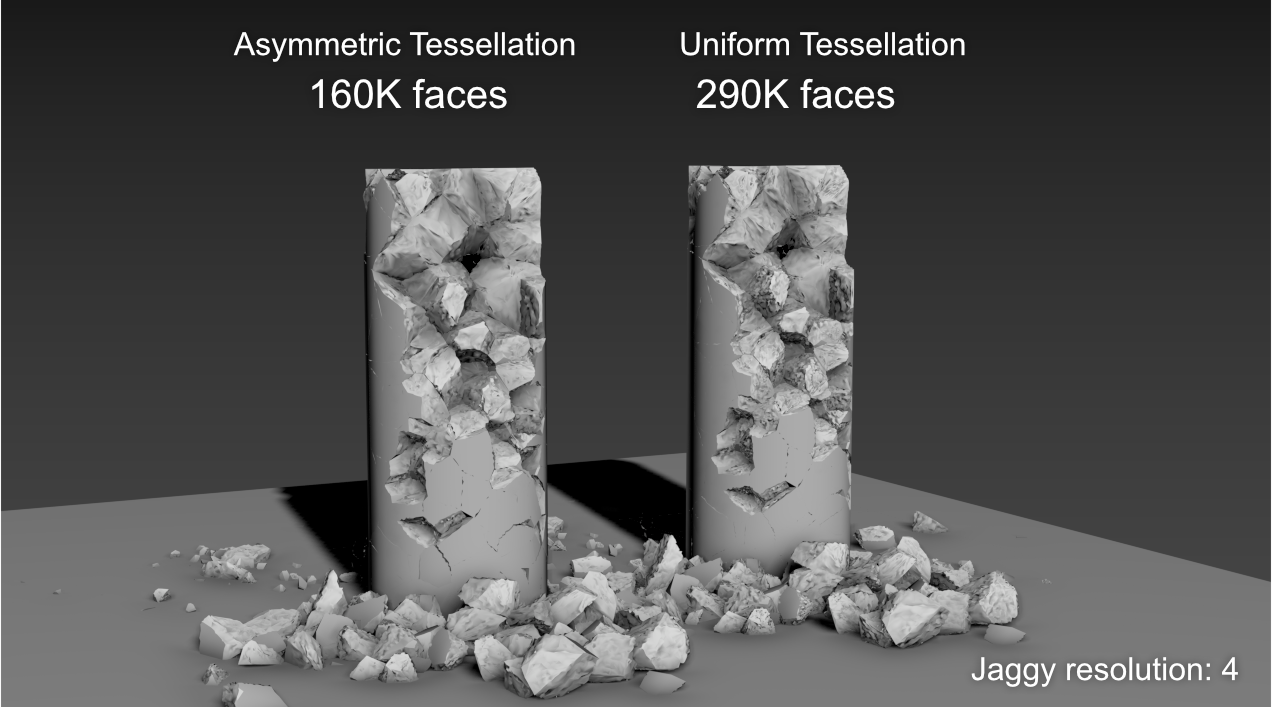
Regarding shattering, PDI Jagginess gets a new “Asymmetric tessellation” mode which generates nearly 50% fewer polygons with an appearance of rough faces close to that achieved using Uniform Tessellation.

There are also useful improvements to the UI, you can add jagginess to all PDI fragments in scene with one click, and there is a new option to set all dynamic values to default for selected rigid bodies.

Last but not least we have fixed quite a few annoying issues from previous version, making the tool more predictable and reliable than ever. You can review below all performance and usability improvements, and you can check the whole list of fixes in the Pulldownit version logs page

Read the full list of fixes in the Pulldownit web site version logs

Licensed users can access already Pulldownit 5.8 from his account and there is a demo version for 3ds Max 2024 in the Thinkinetic web site.

New Jagginess mode “Asymmetric tessellation”, this new tessellation mode generates nearly 50% fewer polygons than the Uniform one with a similar appearance of rough faces.

New Fast Stacking & Deactivation solver, scenes involving hundreds or thousands of fragments in dynamics now computes up to 4 times faster, besides this new solver highly reduces drift motion of fragments resting in the ground.

Instanced shapes supported in core solver, optimized support for instanced shapes in dynamics, allowing to compute massive simulation of thousands of objects faster and with less memory overhead.

Improved performance in fracture against animated bodies, animated or deforming objects now computes faster when colliding and breaking other objects, besides user can easily control the strength of the impact with the new anim speed multiplier parameter.

Wind & Gravity fields range as exclusion volume, rigid bodies and fragments outside of the field decay area are not affected, animated range is supported.

New user parameter Anim Speed Multiplier, allowing to easily control the strength of the impact between animated objects and dynamic ones.

New ability to sync cracker multiplier to node visibility, allowing to modify the strength of the crack effect during the simulation or disable it completely at desired frame.

New option “Add Jagginess to All fragments”, allowing to add jagginess to all PDI fragments in scene with one click.

New Jaggines user prompt, displaying quick info about current jaggy mode and selected fragment state.

New “Fast Stacking” simulation option, user can revert to classic, more accurate, but slower stacking solver by disabling this option.

New UI option “set all dynamic values to default” for rigid bodies.

Pulldownit 5.5 for 3ds Max released

Pulldownit 5.5 for 3ds Max comes with important updates, Shatter it tool has been multithreaded and highly optimized, getting up to 4x faster shattering with regards to previous release, allowing to shatter hi-poly models in hundreds of fragments in a few seconds. Creating Chipping areas on the model is now faster as you can discard shatter centers directly in the viewport just by clicking the mouse over it.

Cracks generation computes now 2x faster and Bounded Cracks has been enhanced with the ability to turn them dynamic at the desired frame, allowing to create easily stress cracks that ends up tearing the surface completely at some moment.

Working in complex destruction scenes is easier and more intuitive, in cases of many objects fracturing, dynamic solver has been adjusted to get nice fracture results with default parameters and when two objects collide each other you can decide which of them will break in first place simply by reducing its hardness value.

Regarding the UI, in this new version you can create several fracture objects at once or create several crackers at once and modify them, there are other nice additions like toggle display of all crackers paths with one click.

Last but not least we have fixed quite a few annoying issues from previous version, making the tool more predictable and reliable than ever.

You can review below all performance and usability improvements and you can check the whole list of fixes in the Pulldownit version logs page:

Read the full list of fixes in the Pulldownit web site version

Licensed users can access already Pulldownit 5.5 from his account and there is a demo version for 3ds Max 2024 in the Thinkinetic web site.

Shatter New Features

Shatter it multithreaded, getting up to 4x faster shattering allowing to shatter an object in hundreds and thousands of pieces in a few seconds.

New ability to remove shatter centers directly in the viewport, when in Shatter it draft mode simply by clicking mouse + ctrl key, the selected shatter center is deleted.

Dynamics New Features

Cracks Generation 2x faster, stress cracks or combinations of stress and dynamic cracks now computes 2 times faster.

New ability to generate Bounded Cracks until frame , stress crack propagation can be set to last until desired frame, after that it continues as an usual dynamic crack.

Initial velocity can be set for “activation at frame” fracture bodies, linear and angular velocity can be added to static fractures bodies, setting in this way the initial motion direction when the object becomes dynamic.

More intuitive behaviour in collision between fracture bodies, user can decide which of them will break in first place simply by reducing its hardness value. Besides small fragments collisions don’t trigger fracture anymore, therefore fracture activation starts always at the exact impact moment between the two objects.

UI Enhancements                                                                                                                   

New Ability to create several fracture bodies at once

New ability to set parameters for several fracture bodies at once.

New ability to set initial velocity at random for many fracture bodies

New ability to edit name of selected Cracker.

New ability to show/hide all Crackers paths at once.

New ability to set parameters for several Crackers at once.

New ability to create Crackers for all parented curves at once.


Pulldownit for 3ds Max 2024

Pulldownit , the destruction plugin, is already available for 3d Max 2024 , you can learn more about latest features of PDI in this great tutorial by Esteban Cuesta:

Oneiric temple destruction in 3ds Max

3d Max 2024 itself brings quite a lot of new features for modeling, animation and rendering and a high performance boost when working with STL models.

In the modelling field introduces a brand new boolean modifier, contrary to classic compound objects,  boolean operations are now managed in the modifiers stack so user can remove or re-order them seamlessly, in addition it can convert the model to an OpenVDB version making the boolean operation more robust and independent of the source topology. Array Modifier introduced in previous version gets a new Phyllotaxis distribution mode for generating spiral pattern as seeing in many natural structures like flowers. The whole Modifiers tab has been ported to QT making it faster navigation and includes a handy search filter for fast selection on the long modifiers list.

The slate material editor has been rewritten using QT making it much more customizable, and besides user can now package several nodes into one single compound for better legibility when working with complex graphs. In addition there is a new Material Switcher node allowing to quickly change the material of an object for fast look-dev workflow

Animation has got also an important update, a new “Transform List” controller allows to add multiple controllers to an object and blend them together, in addition motion paths can now be displayed and adjusted in viewport for all controllers types.

Max 2024 introduces support for the OCIO colour-management broadly used in the animation industry although Gamma workflow is still the default mode, MaxToA now supports OCIO standard as well.

So a noticiable amount of improvements, Autodesk continues strengthen 3ds Max for polygonal modelling and visualization task, though there are some important enhancements for animation this time, hope it continues in the following updates this year.

Eloy Andaluz introduces all of these new features in a great demo video you can review here:

Tutorial: Oneiric temple destruction in 3ds Max

In this great tutorial Esteban Cuesta show us how to crack and destroy an oneiric temple using Pulldownit 5 in 3ds Max , he explains step by step how to create long cracks over the surface before destroying the whole model to get a nice crumbling effect, worth to review it.

Bounded cracks is a new feature introduced in Pulldownit 5.0
allowing to create cracks over the surface of 3d models and controlling the strenght and extent of the crack easilly.

Final shot here:

Thank you Esteban for this great tutorial !

Pulldownit for 3D Max 2023

Pulldownit , the destruction plugin, is already available for 3ds Max 2023 an brings an important enhancement, Shatter it tool is now 4 times faster. This new update v 5.3 will be available for the rest of supported 3ds Max versions in the following weeks.

Max 2023 itself brings several useful improvements, Retopology tool has been boosted with a new auto remesh option allowing to get quickly good results with less preparation of the scanned model, besides Retopology now preserves important mesh features like uvs, vertex colors and such, which is a huge time saver when the model involved is already mapped.

In the modelling field Smart Extrude, introduced first in Max 2022, has been enhanced with the ability to cut partially through an editable poly, besides it can be used along with the new working pivots feature allowing to modify a polygonal surface quickly or merging other elements into it.

Other interesting features are the new glTF exporter for those working in 3d models for web visualization and a revamped autobackup behaviour that can be tracked and controlled easily in the UI.

Since several years ago Autodesk is focused in strengthen 3ds Max for polygonal modelling and visualization tasks, that’s good, however 3ds Max is being increasingly used for visual effects due to its power to handle large scenes smoothly and specially the bunch of third party plugins intended for dynamics effects tightly integrated inside it, so an update to Bifrost is highly demanded for those working in VFX.

Eloy Andaluz introduces all of these new features in a nice video you can review here:

Tutorial: Abbey destruction in 3ds Max

Some of Pulldownit users has asked us how we did the stunning cathedral destruction in latest PDI reel, so we have decided to make a video tutorial explaining it step by step, and as you can see in the video below , it isnt dificult indeed,

Thank you to Esteban Cuesta for this great tutorial and final shot, please remember to “like” the video if you liked it:)